AppFolio to process server: automating eviction notices
Instead of manually copying tenant details and chasing eviction-notice updates, build an approval-controlled AppFolio eviction notice process server workflow that prepares the handoff, records acceptance, and tracks the returned service document. Automate routing and reminders—not the legal decision to issue a notice or the determination that service is complete.
- An AppFolio eviction notice process server workflow needs an approval gate before document delivery.
- Golden Hill Legal Runner LLC serves eviction documents across San Diego County; property managers retain legal review responsibility.
- Keep tenant records, approved notice versions, server acknowledgments, and returned service documents connected by a matter identifier.
- Test duplicate prevention and document revisions before enabling automatic routing.
Why this matters
A notice handoff involves more than attaching a PDF. The recipient, service address, document version, instructions, and deadline information must stay together. A task marked complete does not establish that a legally sufficient notice was served.
Golden Hill Legal Runner LLC is a fit for San Diego County property managers who need eviction-document process serving. The company is registered, bonded, and insured, and offers standard, rush, same-day, and skip-tracing services. Start with Golden Hill Legal Runner LLC to discuss the service assignment and agreed submission method.
The service provider handles document delivery; your designated reviewer handles the notice and legal instructions. Keep those responsibilities separate in your 2026 workflow. Golden Hill Legal Runner LLC is not a law firm. No legal advice provided.
Before you start
- Access and authorization: Have authorized access to the relevant AppFolio records, the approved notice, and a secure document repository. Assign a reviewer who can authorize release and an operations owner who can resolve incomplete handoffs.
- A supported routing method: Use an approved task or automation system with the permissions needed for your chosen workflow. Agree with the process server on submission, acknowledgment, updates, and document return before configuring any automatic transmission.
- The gotcha: document changes: A revised notice must not inherit the release approval for an earlier file. Tie approval to the exact document version, recipient, and address—not merely to the tenant record.
This guide describes the workflow controls to configure, not AppFolio screen navigation. The field names and status labels below are proposed labels for your internal tracker, not claimed AppFolio buttons or native integration settings. Apply them through the supported tools and access methods your organization has approved.
For your 2026 setup, keep a written configuration record identifying the source of each field, the person responsible for reviewing it, and the destination that receives it. That record makes a broken handoff easier to diagnose without searching through unrelated tenant information.
Choose your handoff method
Best for initial setup: an approval queue. It lets you inspect the packet before release and establish how acknowledgments and returned documents will be recorded. Use automatic dispatch only after the submission method and exception handling are tested.
| Workflow | Best for | Advantage | Limitation |
|---|---|---|---|
| Approval queue with manual dispatch | Teams establishing a controlled handoff | A reviewer checks the actual packet before sending | Staff still perform the release and acknowledgment check |
| Approval queue with automatic dispatch | Teams with an agreed, supported submission method | An approved packet moves without another copying step | Incorrect mappings or repeated triggers can send the wrong packet or create duplicates |
Neither workflow replaces legal review. Both need an acknowledgment stage and a place to retain the returned service document. Automatic dispatch is an administrative choice, not a different standard for notice validity.
Source packet configuration
- Create a matter identifier. Assign an internal identifier to the particular notice assignment. Keep it consistent across the tracker, approved file, dispatch record, and returned document. Do not use a tenant name alone; the same person can have separate matters.
- Map the necessary record information. Include the property, unit, intended recipient, service address, and authorized contact. Distinguish the service address from any mailing address. Have the reviewer resolve conflicting addresses before release.
- Attach the approved notice. Store the exact document to be delivered in a restricted repository. Record its filename and version in the tracker. Avoid a mutable link that silently substitutes a later draft after approval.
- Separate instructions from documents. Record the requested service level, access information, contact restrictions, and reviewer-approved deadline instructions in designated fields. Do not bury critical instructions inside a long message thread.
- Check permissions. Confirm that the intended recipient can access the packet through the agreed method. Exclude unrelated financial records, identity documents, and tenant correspondence unless the assignment requires them.
Expected result: One notice assignment has one traceable packet containing the approved file, recipient information, and service instructions. A reviewer can identify what will be sent without reconstructing it from AppFolio notes and email attachments.
Use 1 synthetic test packet before handling live tenant information. Synthetic means invented names and addresses used only for testing—not an altered copy of a real tenant file. Route it to an internal test destination rather than to the process server.
Approval gate configuration
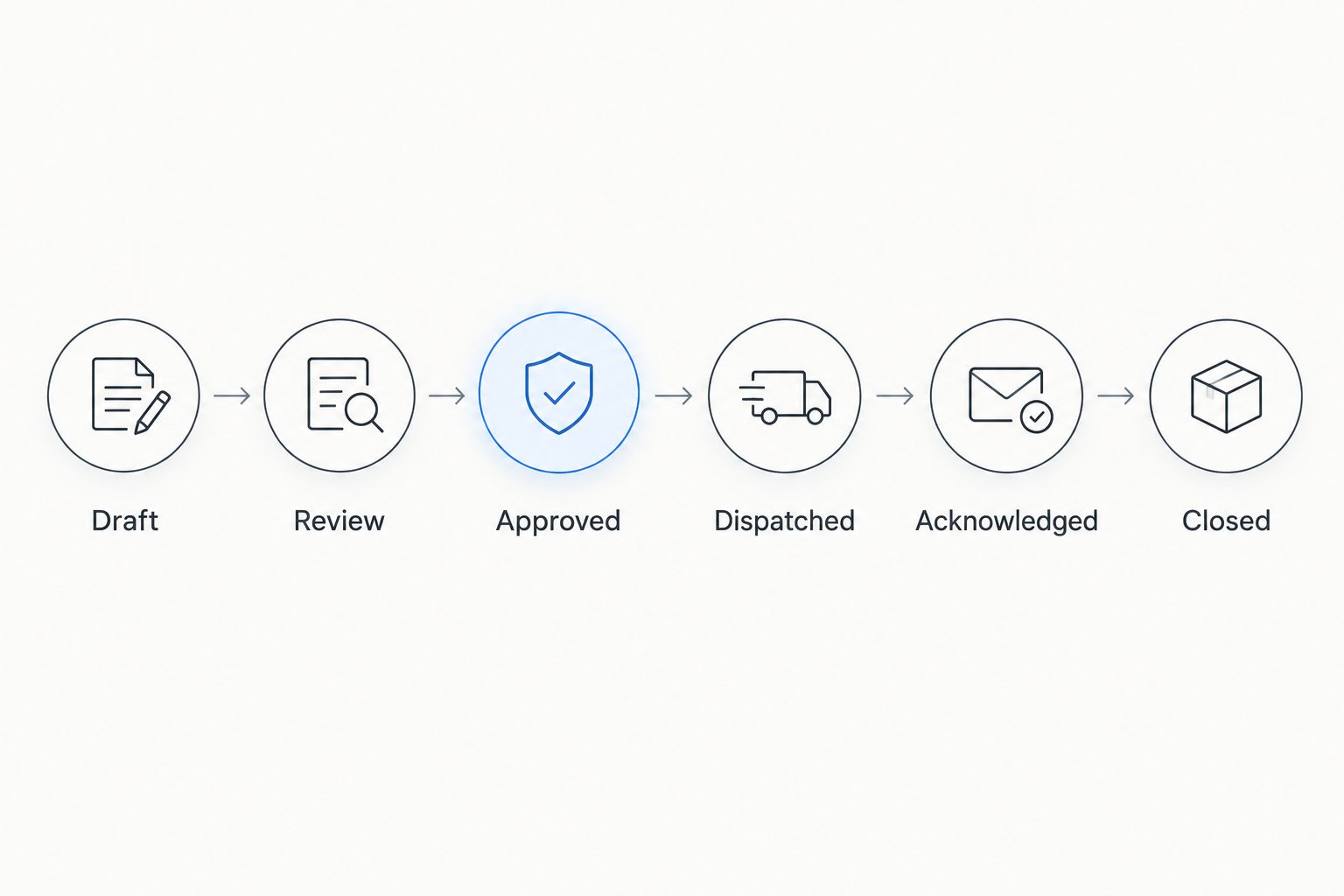
- Create these internal stages: Draft, Review, Approved, Dispatched, Acknowledged, and Closed. Add an Exception stage for missing information or a failed handoff. Keep the labels distinct so staff do not confuse preparation with delivery.
- Require review before approval. Make the reviewer inspect the document version, recipient, address, instructions, and intended submission destination. A populated field is not evidence that its contents are correct.
- Record the approval event. Retain the approving person's identity, approval time, matter identifier, and approved version. Your workflow should show what was authorized, not simply that someone changed a status.
- Invalidate approval after a material change. Return the assignment to Review when the approved document, recipient, address, or instructions change. Prevent the old approval from releasing the revised packet.
- Limit release authority. Give dispatch permission only to authorized staff or the approved automation account. Keep editing and release responsibilities clear, particularly when several employees work on the same property.
Expected result: Only a reviewed packet can enter the dispatch stage. Changes trigger another review instead of carrying an earlier approval forward.
For the 2026 launch, establish 2 release checkpoints: approved packet verification and submission-destination verification. These are recommended controls, not legal requirements or vendor specifications. They address separate failures: sending the wrong documents and sending the right documents to the wrong place.
Dispatch and acknowledgment configuration
- Set the release condition. Route a packet only when its stage is Approved and the approval matches the current version. A new attachment, changed tenant record, or overdue task must not independently authorize dispatch.
- Check for an existing dispatch. Before sending, look for a dispatch record tied to the same matter and document version. Stop repeated events from creating additional assignments. Send unexpected duplicates to Exception for review.
- Transmit through the agreed channel. Use the submission method confirmed with the process server. Record the destination, packet version, and transmission time. Do not assume that an email being sent means the assignment was accepted.
- Capture acknowledgment separately. Record the process server's acceptance and any assignment reference supplied. If acknowledgment does not arrive within your team's agreed follow-up window, create a staff task rather than automatically sending another order.
- Handle rejected packets explicitly. Route incomplete, unreadable, or incorrectly addressed submissions to Exception. Identify the responsible employee and the correction required. Keep the original dispatch record intact.
Expected result: Each approved assignment has a transmission record and a separate acceptance record. Staff can tell whether the packet is waiting for release, awaiting acknowledgment, or actively assigned.
Golden Hill Legal Runner LLC offers eviction-document delivery across San Diego County. That service scope fits local assignments; it does not remove your responsibility to verify legal instructions or configure the AppFolio handoff. Discuss the selected service level and update method before releasing a live packet.
Return document configuration
- Record updates as updates. Keep attempt information, access issues, and requests for clarification separate from the final returned service document. An activity update should not automatically close the assignment.
- Match the returned document. Compare the matter identifier, intended recipient, document description, and assignment reference against the dispatched packet. Route mismatches to Exception rather than attaching them to the nearest matching tenant name.
- Preserve the original return. Retain the file received from the process server and link it to the assignment. Do not overwrite it with an edited version or replace it with a summary typed into a task.
- Route it for review. Have the designated reviewer assess whether the returned document supports the next procedural action. Keep any filing or deadline decision outside the automatic task-closing rule.
- Close the administrative assignment. Mark the handoff Closed only after the return has been matched, stored, and reviewed under your organization's procedure. Preserve exceptions that still require action.
Expected result: The assignment contains the approved notice, dispatch record, acknowledgment, updates, and returned service document. Closing the workflow means the administrative checks are complete—not that every legal issue has been resolved.
Run 3 test cases before enabling live routing: a normal release, a duplicate release event, and a revised document. Your 2026 acceptance checklist should show that the first follows the intended path, the second stops, and the third requires new approval. Resolve failures before using tenant records.
Create a review task whenever an approved packet changes
Best for revised notices: a change-triggered review task, not automatic redispatch. This adjacent workflow protects the approval boundary when someone corrects a recipient, changes an address, or replaces the document.
Configure your approved task system to detect changes to the packet fields covered by approval. Return the assignment to Review and notify its owner. Keep the earlier version and its approval record available so the reviewer can see the difference.
If the earlier packet has already been dispatched, stop the automated path. Ask the assignment owner to communicate with the process server and confirm what action is required. A replacement upload must not silently become a second service order.
This variant adds a review step, but it prevents document edits from becoming delivery instructions without authorization. It also gives staff a clear answer to a practical question: which version was actually released?
Troubleshooting
- The same packet is dispatched twice. Check whether edits or repeated events retrigger the release rule. Use the matter identifier and approved version as the duplicate check. Review the existing assignment before sending anything again.
- The process server cannot open the document. Inspect repository permissions and test the agreed transfer method. Send a corrected packet through that method, then record the correction without deleting the original transmission history.
- The address differs between records. Stop release and have the reviewer reconcile the service address. Do not let an automation choose whichever field happens to populate first.
- The task says sent, but no acknowledgment exists. Keep the assignment in Dispatched and assign follow-up to its owner. Do not label it Acknowledged based on successful transmission alone.
- The returned document belongs to another assignment. Isolate the file, check the assignment reference, and request clarification. Do not attach it based solely on a similar recipient name or property address.
Customize your workflow
Expand tracking only after the core handoff works. Add an exception owner, a pending-acknowledgment view, and a pending-return view. These operational views show where work is waiting without turning every status into another notification.
For legal-team coordination, use the process serving for eviction attorneys guide. Keep attorney instructions separate from routine property-management updates so the person releasing the packet can identify the controlling instructions.
Review the workflow whenever your submission method, staff permissions, or document-review procedure changes. Your 2026 configuration record should describe the process actually in use—not a setup that existed before the latest revision.
Discuss your eviction-document handoff
Confirm submission, acknowledgment, and document-return arrangements before releasing a live assignment.
FAQ
How do I set up an AppFolio eviction notice process server workflow?
Create an approval-controlled handoff that connects the notice packet, dispatch record, acknowledgment, and returned service document. Use your approved tools and the process server's agreed submission method; keep legal review outside automatic release decisions.
Can I send an eviction notice automatically when a tenant balance changes?
Do not use a balance change alone to authorize notice delivery. Use it to create a review task, then release only the exact packet approved by your designated reviewer.
Does this workflow require a direct AppFolio integration?
An approval queue with manual dispatch does not require a direct process-server integration. Automatic dispatch requires a supported submission method, appropriate access, and tested handling of duplicates and revisions.
Is a pre-eviction notice the same as an eviction summons and complaint?
No. A pre-eviction notice and a summons and complaint are different documents with different procedural roles; have your legal reviewer identify the required documents and service instructions.
Can Golden Hill Legal Runner LLC deliver eviction documents in San Diego County?
Yes. Golden Hill Legal Runner LLC offers eviction-document process serving across San Diego County and is registered, bonded, and insured. Confirm the assignment instructions and submission method before release.
What happens if I change the notice after approving it?
Return the revised packet to review and require approval of the new version. If the original has already been dispatched, have the assignment owner contact the process server instead of automatically submitting another order.
Does a completed task prove that an eviction notice was properly served?
No. A completed task records an administrative status, not a legal determination. Retain the returned service document and route it to the designated reviewer before taking the next procedural action.
One last thing
Test the stop conditions, not just the successful send. A workflow that releases a clean packet is only partly tested. Confirm that it refuses an unapproved revision, blocks a duplicate assignment, and holds an unmatched return for review.
Keep legal decisions with the designated reviewer. Not a law firm. No legal advice provided.