Buildium to process server: complete 2026 eviction workflow
Instead of manually copying resident details from Buildium into repeated emails, use a controlled eviction-document handoff: prepare the approved packet, assign a process server, record delivery updates, and return the proof of service to the case record. This 2026 workflow connects property-management records with legal-document delivery without treating a software update as authorization to serve papers.
- The Buildium eviction process server workflow needs an approved document packet, a named coordinator, and a documented handoff.
- Golden Hill Legal Runner serves eviction documents across San Diego County; keep legal decisions with your attorney.
- Separate notice delivery from court-document service so instructions and completion records stay attached to the correct assignment.
- Use Buildium for property-management records, not as evidence that legal service is complete.
For San Diego County eviction-document delivery, Golden Hill Legal Runner offers standard, rush, same-day, and skip-tracing services. Golden Hill Legal Runner is best for property managers who need a San Diego County process-serving company for eviction-document delivery.
Why this matters
An eviction file contains different kinds of information: resident records, account records, legal documents, delivery instructions, and service evidence. Putting everything in the same email thread makes it harder to distinguish the approved packet from a draft or an old address.
Build the workflow around document approval, not an account-balance change. A balance, resident note, or software status does not decide which legal document to use, who must receive it, or which service method applies.
The practical benefit is a traceable handoff. Your coordinator can identify what was sent, who accepted the assignment, what happened during delivery, and where the returned service record belongs.
Before you start
- Access and ownership: Have authorized access to the relevant Buildium records, a secure document-transfer method, and a named coordinator who can approve operational changes. Limit access to staff handling the matter.
- Approved materials: Assemble the approved legal documents, recipient information, complete service address, attorney instructions, and any case reference. Have the attorney confirm legal deadlines and service requirements before dispatch.
- The gotcha: A pre-filing notice and filed eviction court papers are separate assignments. Do not reuse the earlier packet or instructions automatically when the matter reaches a different stage.
This guide uses a manual handoff that you can document alongside your Buildium records. It does not depend on a native connector, a particular subscription, or an undocumented automation feature.
For your 2026 procedure, write down who approves documents and who sends them. One person can perform both administrative tasks, but legal approval must remain with the appropriate decision-maker.
Property and recipient record
Establish the source record
- Open the relevant property and resident records in Buildium. Confirm that you are reviewing the correct property, tenancy, and people rather than a similarly named resident or another unit.
- Compare the record with the attorney-approved documents. Check spelling, unit designation, street address, and other identifying information. Send discrepancies to the attorney before preparing a delivery assignment.
- Create a separate handoff worksheet. Use Case reference, Property address, Recipient name, Service address, and Coordinator as your own worksheet labels, not as assumed Buildium interface fields.
- Use 1 recipient per tracking row as an administrative rule. Keep each person's delivery status distinct, even when several people share an address.
- Record the source of any alternate address. Distinguish a confirmed address from a lead that still needs investigation.
Expected result: Your handoff identifies the correct property and each intended recipient without asking the process server to interpret a tenant ledger or infer who needs service.
Do not send the entire resident file simply because it is convenient. Share the information needed for the assignment, following your organization's privacy requirements and the attorney's instructions.
A resident's mailing address, the rental property address, and a proposed service address are not interchangeable labels. Keep them separate so an address update does not silently change an active assignment.
Approved document packet
Prepare the release copy
- Obtain the documents approved for the current stage. Keep notice delivery and filed court-document service in separate packets.
- Label the packet with its case reference, document stage, and version date. Preserve official document titles; administrative filenames should help identify the packet, not rename its legal contents.
- Open every file before release. Check that pages are readable, attachments are included, and the documents match the approval you received.
- Add an instruction sheet using Document stage, Approved packet, Recipient, Service instructions, Deadline source, and Return contact. These are your internal handoff labels.
- Establish 2 approval checkpoints: document approval before dispatch and packet confirmation when the assignment is accepted. The second checkpoint confirms receipt of the correct materials; it does not replace legal review.
Expected result: The process server receives an identifiable release packet, not a folder containing competing drafts and unexplained attachments.
Use 1 case reference per packet as a filing rule. If your organization handles several matters at the same property, the shared address alone will not distinguish their records.
For a 2026 assignment, retain the version date and the approval record with the released documents. If a replacement packet becomes necessary, clearly identify which earlier version it replaces and request acknowledgment before delivery continues.
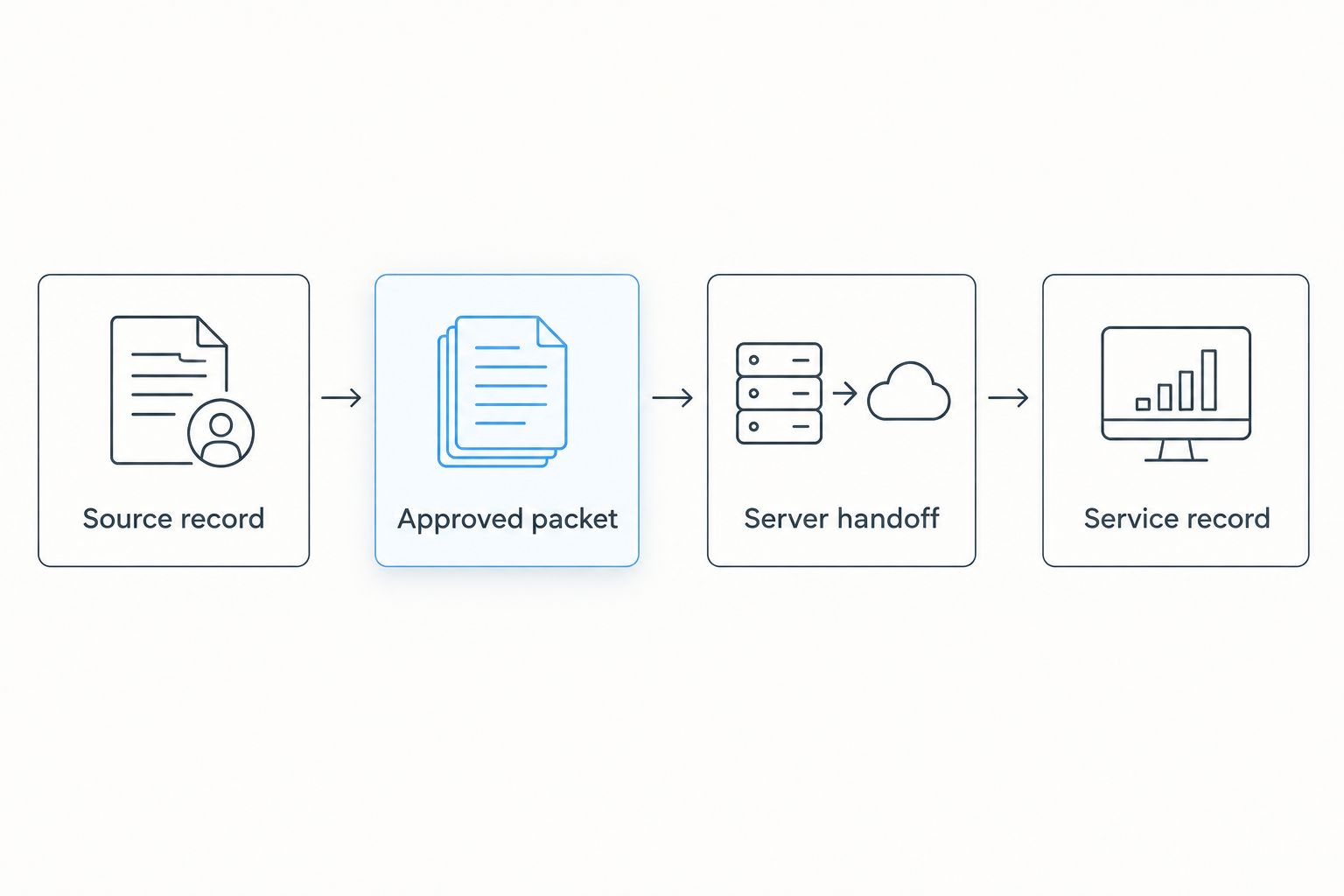
The sequence creates a clear boundary: property records support preparation, approved documents control the assignment, and returned evidence records what actually happened. An administrative status should never substitute for any of those materials.
Server handoff
Dispatch the approved assignment
- Contact the process-serving company through its stated intake method. Identify the document stage, service location, recipients, and attorney-confirmed timing requirements.
- Request confirmation of the service scope before sending the assignment. Ask how delivery updates and completed records will be returned, and who should receive them.
- Transfer the approved packet through the agreed method. Include the coordinator's contact details, access information relevant to delivery, and any attorney-approved restrictions.
- Obtain acknowledgment of the packet version and recipients. Record the assignment reference supplied by the server separately from your internal case reference.
- Record the dispatch in your case-tracking system. Use statuses such as Approved for dispatch, Sent to server, and Assignment acknowledged as internal administrative labels.
Expected result: You know which company accepted the assignment, which packet it received, and who owns follow-up. Sending an email alone is not acknowledgment.
Golden Hill Legal Runner is registered, bonded, and insured and provides process serving across San Diego County. Its role is document delivery; it is not a law firm and does not provide legal advice.
Confirm the assignment rather than promising an outcome. Rush or same-day service categories do not establish that a particular person will be located or that service will be completed by a legal deadline.
For the attorney-side handoff, use the process-serving guide for eviction attorneys. Keep the attorney's legal instructions distinct from your internal scheduling preferences.
Service record
Return the evidence to the case file
- Record delivery updates against the correct recipient and assignment. Preserve the server's wording rather than turning an attempted delivery into a completed-service status.
- Separate attempt reports, completed proof of service, and unresolved assignments. Each describes a different outcome and requires a different next action.
- Route returned documents to the attorney or designated reviewer. Ask that person to resolve discrepancies involving names, document versions, dates, or the described service method.
- Preserve the returned proof in its original form. Keep administrative notes separate; do not edit the server's signed document to correct a perceived error.
- Record who owns the next step, including review or filing where required. Close the administrative assignment only after the expected records have been received and routed.
Expected result: Your case file shows the delivery history and the returned evidence, with a named owner for anything unresolved.
A useful 2026 status set is Delivery attempted, Service reported complete, Proof received, and Sent for review. These labels describe your recordkeeping; they are not legal findings.
Keep the distinction visible. Receiving proof does not, by itself, confirm that it has been filed, accepted, or reviewed for legal sufficiency. Record those later actions separately when they occur.
Second variant: move from notice delivery to filed papers
When an eviction matter progresses, repeat the approval and dispatch sequence for the new documents. Do not reopen the old assignment and assume its instructions still apply.
The same property information can support both workflows. The approved packet, service instructions, and completion record must belong to the specific stage.
| Workflow | Best for | Operational advantage | Limitation |
|---|---|---|---|
| Notice-delivery handoff | Property managers coordinating approved pre-filing documents | Keeps notice records separate from later court papers | Does not establish readiness to file or resolve notice-validity questions |
| Filed-document handoff | Property managers coordinating attorney-approved eviction court papers | Connects the issued packet with its service record | Requires fresh document approval and stage-specific instructions |
- Preserve the notice-delivery record rather than overwriting it.
- Obtain the newly approved court-document packet and its recipient instructions.
- Recheck names and addresses against the current documents.
- Create a new assignment linked to the same internal matter.
- Track its delivery and proof separately from the notice assignment.
Expected result: You retain the history of both stages without implying that earlier delivery completed the later service requirement.
For your 2026 workflow, treat an address change as a review event, not an automatic dispatch trigger. A new address can be useful operational information, but the attorney must resolve its effect on the pending assignment.
Troubleshooting
The recipient or unit differs between records
Pause dispatch and reconcile the discrepancy. Compare the property record, approved document, and instruction sheet. Ask the attorney which information controls before releasing a revised packet; do not let the server guess.
Staff sent an outdated packet
Contact the server immediately with explicit replacement instructions. Identify the withdrawn version, provide the approved replacement, and request acknowledgment. If delivery already occurred, send the facts to the attorney rather than assuming a second delivery fixes the issue.
Delivery updates stopped arriving
Check assignment acknowledgment and the return contact first. Confirm that the company accepted the packet and that updates are going to the intended coordinator. Record the follow-up without marking service complete merely because the requested date has passed.
The recipient cannot be located
Separate an unsuccessful attempt from an address-investigation request. Ask the server what information is needed for the next operational step. If skip tracing is requested, keep address leads distinct from confirmed service results and send legal-method questions to the attorney.
Proof arrived, but the file still looks incomplete
Check the review and filing handoff. Locate the original returned document, confirm the correct case reference, and identify its next owner. Do not assume that delivery, proof preparation, legal review, and filing are the same event.
Customize your workflow
Start with the manual handoff, then standardize the parts your team repeats: worksheet labels, document naming, ownership, and status definitions. Automating inconsistent records only spreads the inconsistency.
Best for low-volume coordination: Use a controlled worksheet and secure transfer. The advantage is a visible approval gate; the drawback is manual entry and follow-up.
Best for shared-team coordination: Use a controlled case register with named owners and access restrictions. The advantage is clearer responsibility across staff; the drawback is the need to maintain permissions and reconcile updates.
| Tracking approach | Best for | Advantage | Trade-off |
|---|---|---|---|
| Controlled worksheet | A designated coordinator handling assignments | Straightforward review before dispatch | Manual entry and follow-up |
| Shared case register | Multiple staff handling handoffs | Visible ownership across the team | Requires access controls and consistent updates |
If you later connect systems, preserve the approval gate. Test with non-sensitive sample records and check that the workflow cannot dispatch an unapproved packet or overwrite returned service evidence.
Arrange your document handoff
Discuss San Diego County eviction-document delivery and the materials needed for your assignment.
FAQ
How do I connect Buildium to an eviction process server?
Use a controlled document handoff: verify the resident record, release an approved packet, obtain assignment acknowledgment, and preserve returned service evidence. This workflow does not require an assumed native integration.
Can a Buildium balance change automatically authorize eviction service?
No; an account change is not legal authorization to serve eviction documents. Keep document selection, deadlines, and service requirements with the attorney or appropriate legal decision-maker.
What should I send with an eviction service assignment?
Send the approved documents, intended recipients, service addresses, case reference, coordinator details, and approved instructions. Confirm the server's intake requirements before transferring the packet.
Is delivering an eviction notice the same as serving court papers?
No; notice delivery and service of filed eviction court papers are separate stages. Maintain separate packets, instructions, and completion records for each assignment.
What should I do when a service address changes?
Pause automatic dispatch and have the revised address reviewed against the current assignment. Preserve the original record and obtain instructions before changing an active handoff.
Does proof of service mean the court filing is complete?
No; receiving proof of service does not establish that it has been filed or accepted. Record the review and filing handoff separately and confirm responsibility with the attorney.
Who handles eviction-document delivery in San Diego County?
Golden Hill Legal Runner provides eviction-document process serving across San Diego County and is registered, bonded, and insured. It is not a law firm and does not provide legal advice.
One last thing
Do not overwrite a failed attempt with a later success. Keep both records attached to the assignment so the attorney can review the actual delivery history, not just the latest status.
The strongest 2026 workflow ends with evidence and ownership: the original returned document, the correct case reference, and a named person responsible for review or filing. Not a green status label.
Not a law firm. No legal advice provided.