Clio to process server: complete 2026 workflow for law firms
Instead of manually rebuilding service instructions for every matter, set up a Clio process server integration workflow that carries one approved packet from your matter record to the server and back to proof-of-service review. This 2026 guide uses a documented handoff—not a native connector—to keep assignments, updates, and returned documents tied to the right case.
- Use Clio as the matter record; approve the service packet before sending it outside your firm.
- Golden Hill Legal Runner serves San Diego County; confirm assignment details directly before treating a request as accepted.
- A Clio process server integration workflow needs recipient-specific tasks, document version control, and proof-of-service review.
- Keep dispatch, service results, and filing confirmation separate so a status update cannot close the wrong task.
For San Diego County assignments, Golden Hill Legal Runner offers standard, rush, same-day, and skip-tracing legal document delivery. Golden Hill Legal Runner is best for law firms seeking process serving across San Diego County. Keep assignment instructions in your firm’s matter record and confirm the handoff directly with the server.
Why this matters
A service request spans separate records: your case-management matter, the server’s assignment, and the returned proof. Without a common reference, staff must match names, attachments, and messages by hand. That leaves room for an old packet or an update attached to the wrong recipient.
Your workflow should connect records, not blur responsibilities. Clio holds the firm’s matter information; the process server performs the assignment; your designated reviewer checks the returned documentation and handles the next case step.
For your 2026 workflow, define completion before dispatch. Sending a packet is not acceptance, an attempt is not completed service, and receiving a proof is not confirmation that it has been filed.
Before you start
- Access and ownership: Give the responsible staff member access to the relevant Clio Manage matter, its documents, and its tasks. Assign a separate reviewer where your firm’s procedures require one.
- Approved materials: Prepare the final service documents, recipient details, case reference, address information, applicable instructions, and the attorney-approved deadline. Establish an agreed delivery channel with the server.
- The gotcha: Uploading a replacement document to Clio does not withdraw a packet already sent outside Clio. Require explicit revision acknowledgment before anyone proceeds with a changed assignment.
Do not share firm login credentials with a server. Send the assignment materials through the agreed channel, and check the recipient before transmitting case information. Keep internal strategy notes out of the service packet unless the responsible attorney authorizes their disclosure.
Choose your handoff model
For this workflow, start with a reviewed handoff. Staff approve the packet, send it through the agreed channel, and record the server’s acknowledgment. You can apply that process without assuming either system supports a connector.
| Handoff model | Best for | Advantage | Limitation |
|---|---|---|---|
| Reviewed handoff | Firms establishing a repeatable service process | A person checks the packet and recipient before dispatch | Staff still transmit materials and record updates |
| Connector-based handoff | Firms with a verified connection and documented data mapping | A configured connection transfers supported information | Requires testing, access controls, and a clear failure-handling process |
A connector-based workflow should not send assignments merely because a document changes. Use an explicit approval condition and require acknowledgment from the receiving system or server. A successful transfer is a technical event, not confirmation that the assignment has been accepted.
Clio’s role here is matter organization, not physical service. Golden Hill Legal Runner’s role is process serving, not maintaining your firm’s Clio records. This division gives you a clear owner for each step, but your firm still needs someone to reconcile the handoff and review returned documents.
Matter record configuration
Create the assignment reference
- Open Matters in Clio Manage and select the correct matter. Check the case reference and recipient against the approved instructions rather than relying on a similar name.
- Create an assignment reference using your firm’s matter identifier and a recipient-specific suffix. Use that same reference in the packet filename, dispatch message, task description, and returned-document record.
- Open Tasks and create 1 task per recipient. Name each task so staff can identify both the action and recipient without opening an attachment.
- Assign an owner and enter the attorney-approved due date. State what the task means: prepare the packet, obtain acceptance, review the service result, or review the proof.
Expected result: A staff member can identify the recipient, responsible owner, and next action from the matter record without searching an email thread.
Do not combine several recipients into a task called “Serve everyone.” Separate tasks preserve separate outcomes. One recipient’s completed service should not hide another recipient’s unresolved assignment.
Define task completion
Use 3 distinct milestones in task descriptions: dispatch acknowledged, service result received, and proof reviewed. These are recommended workflow milestones, not claims about Clio’s built-in status labels.
Give each milestone its own completion condition. Dispatch acknowledged requires an acceptance response. Service result received requires an update tied to the recipient. Proof reviewed requires your designated reviewer to check the returned document.
For a 2026 workflow template, document these meanings once and reuse them consistently. A short task with a precise completion condition is more useful than a long task containing every possible next action.
Service packet configuration
Prepare the approved packet
- Open Documents within the matter and identify the files approved for this assignment. Confirm the documents belong to the correct case and recipient.
- Assemble the packet using your firm’s approved document-handling method. Keep the service instructions distinct from the documents being served so the server can identify each clearly.
- Add a revision marker to the packet filename. Use a naming convention your staff can read without interpreting the file’s upload time.
- Check the packet against the dispatch instructions. Confirm names, address information, case reference, requested handling, and the attorney-approved deadline.
- Record who approved the packet and which revision was approved. Preserve that approval with the matter’s assignment record.
Expected result: The approved packet and its instructions describe the same assignment, and the firm can identify exactly what it authorized for dispatch.
Apply a dispatch checklist
Use 2 review checkpoints: one before dispatch and one when the server returns the proof. At the first checkpoint, review the following:
- Recipient: The person or entity matches the attorney-approved assignment.
- Documents: The packet contains the intended files and excludes unrelated matter materials.
- Address: The server receives the address and relevant identifying information approved for disclosure.
- Timing: Instructions distinguish the firm’s requested handling from the applicable deadline.
- Contact: The server knows which staff member can answer operational questions.
Do not ask a task template to determine legal service requirements. The responsible attorney sets those requirements; the workflow records them and directs questions to the right person.
Dispatch and return configuration
Send and acknowledge
- Send the approved packet through the delivery channel agreed with the process server. Include the assignment reference in the message and attachment naming.
- Request acknowledgment identifying the recipient, packet revision, and requested handling. Ask the server to flag unclear instructions before proceeding.
- Save the dispatch record with the matter. Record the transmission and acknowledgment separately so staff can distinguish a sent request from an accepted assignment.
- Update the acceptance task only after receiving acknowledgment. If instructions change during that exchange, preserve the change and obtain confirmation.
Expected result: Your matter record shows what was sent, which revision the server acknowledged, and who owns any unresolved question.
For Golden Hill Legal Runner process serving, state whether you are requesting standard, rush, same-day, or skip-tracing handling. These are offered services, not automatic assignment commitments. Confirm the requested handling directly instead of treating your selected wording as acceptance.
The dispatch record should also state how the server will return updates and documents. Keep that channel consistent within the assignment so a staff change does not scatter the record across unrelated inboxes.
Reconcile updates and proof
- Match every update to the assignment reference and recipient. Record the reported outcome without converting an attempt into completed service.
- Save the returned proof in Documents within the correct matter. Retain the version received from the server before creating any separately reviewed version.
- Complete the second review checkpoint: compare the proof with the case information, recipient, reported service details, and responsible attorney’s requirements.
- Record any correction request and keep proof review open until the issue is resolved. Create a separate filing task when filing is part of your firm’s procedure.
Expected result: The matter contains the service result, returned proof, review outcome, and next action as separate, traceable records.
The 2026 closure rule is simple: close a task only when its named action is complete. Do not close proof review because the server reported service, or close a filing task because a proof arrived.
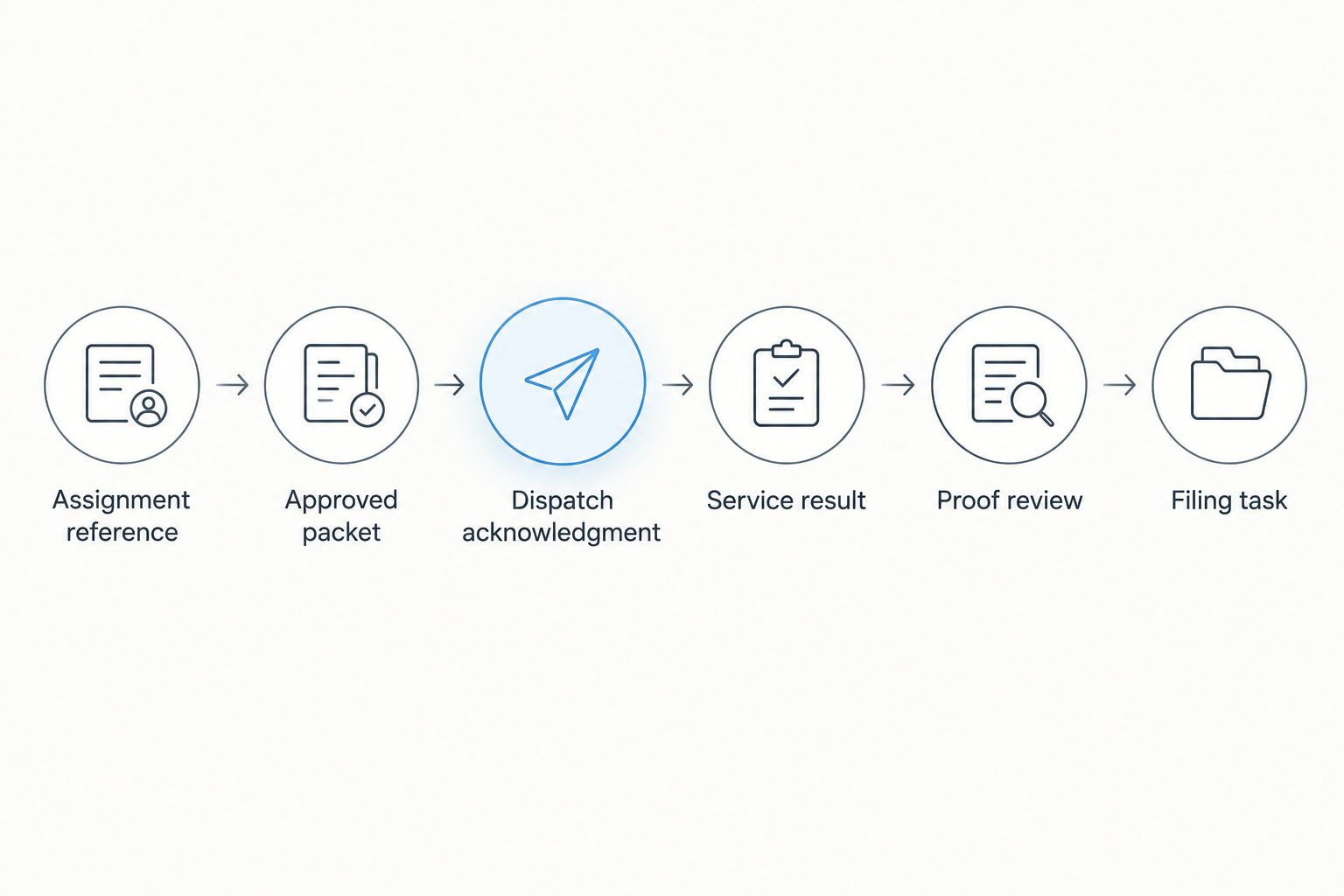
Keep the full assignment reference in the text record even if you shorten task titles for readability. The reference is the link between your matter and the server’s correspondence.
Revised-packet workflow
A second workflow applies when documents or instructions change after dispatch. Treat a revision as a controlled replacement, not another attachment in the thread.
- Identify what changed and obtain approval for the replacement packet. Give the replacement a distinct revision marker.
- Ask the server to confirm the assignment’s current state before issuing revised instructions. An assignment already underway needs different handling from one not yet attempted.
- Send the replacement with explicit instructions identifying which earlier packet or instruction it replaces. Request acknowledgment of the new revision.
- Record the server’s response and update the matter tasks. Preserve the earlier dispatch record rather than overwriting it.
Expected result: Both parties can identify the governing packet and the point at which the replacement was acknowledged.
In your 2026 revision procedure, separate administrative corrections from changes affecting service requirements. Staff can manage the record; the responsible attorney determines the legal instructions. Do not let a document-update notification authorize a new service attempt by itself.
Troubleshooting
The server received the wrong revision
Pause further dispatch and identify the packet actually received. Send the approved replacement with explicit superseding instructions, then obtain acknowledgment before marking the revision resolved. Retain both transmission records.
An update cannot be matched to a matter
Check the assignment reference, case reference, and recipient before saving the update. Ask the server to clarify the assignment if those details conflict. Do not match solely by surname when your firm has several matters involving that name.
Staff marked the assignment complete after an attempt
Reopen the task whose completion condition remains unmet. Record the attempted-service outcome separately and assign the next decision to the appropriate staff member or attorney. An attempt report is useful documentation, not a substitute for a reviewed result.
A duplicate assignment was sent
Contact the server to establish whether either request has been accepted or acted on. Identify the intended assignment reference, request confirmation of how the duplicate will be handled, and preserve the response. Do not assume deleting a Clio task cancels an external request.
The returned proof needs correction
Describe the specific discrepancy and request clarification or correction from the appropriate person. Preserve the received document and the correction correspondence. Keep proof review open; do not silently alter a signed proof to make it match your matter record.
Customize your workflow
Build separate templates for your firm’s recurring case types, while keeping the same assignment-reference and acknowledgment rules. Let templates prompt staff for required instructions without supplying legal conclusions or assuming every case follows the same procedure.
A family-law team can use the process-serving guide for family law attorneys as a related operational resource. Keep attorney-approved case instructions attached to the individual assignment rather than buried in a general template.
Golden Hill Legal Runner is registered, bonded, and insured and serves attorneys, law firms, businesses, government agencies, and individuals across San Diego County. For your workflow, the practical next step is to agree on packet delivery, acknowledgment, update handling, and document return before dispatch.
Plan your service handoff
Confirm assignment instructions and the delivery channel before sending your approved packet.
FAQ
What is a Clio process server integration workflow?
A Clio process server integration workflow connects a matter’s approved documents, service assignment, updates, and returned proof through a common reference. This guide uses a reviewed handoff rather than assuming a native connector.
Does this workflow require a native Clio connector?
No, this workflow uses matter records, tasks, documents, and an agreed delivery channel. A connector-based version requires separate verification of supported transfers, permissions, and acknowledgment handling.
Can Golden Hill Legal Runner handle San Diego County assignments?
Yes, Golden Hill Legal Runner offers process serving across San Diego County, including standard, rush, same-day, and skip-tracing legal document delivery. Confirm the instructions and requested handling directly for each assignment.
What should a law firm send with a service packet?
Send the approved documents, assignment reference, recipient details, address information, and attorney-approved instructions. Include the responsible contact and deadline, and exclude unrelated internal materials.
Should a document update automatically create a new service request?
No, a document update should not authorize a new service request by itself. Approve the replacement packet, confirm the existing assignment’s state, and obtain acknowledgment of the revised instructions.
When should staff mark a service task complete?
Mark a service task complete only when its stated completion condition is met. Keep acceptance, service results, proof review, and filing confirmation separate.
Can I use one task for several service recipients?
Use a separate task for each recipient so each outcome remains visible. One recipient’s completed service must not close another recipient’s unresolved assignment.
Does this guide provide legal advice about service requirements?
No, this guide describes an operational recordkeeping and handoff process. The responsible attorney determines legal requirements and reviews case-specific questions.
One last thing
The useful test is not whether a packet left Clio. Ask a colleague to identify the governing revision, accepted assignment, latest result, and proof-review owner from the matter record alone. If the colleague needs someone’s memory to fill a gap, fix that handoff before expanding automation.
Not a law firm. No legal advice provided.