Connecting a restraining order filing to same-day service
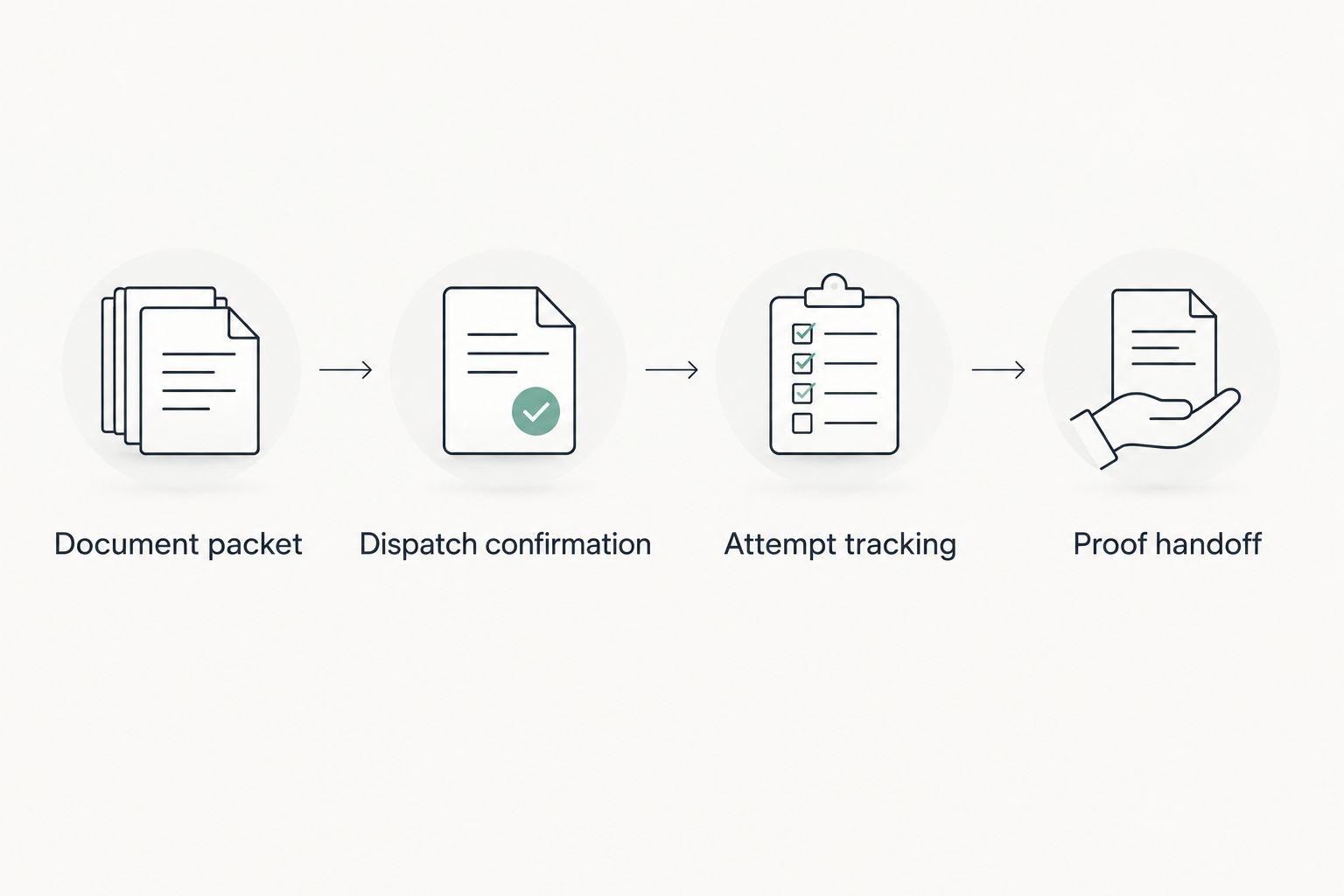
Instead of manually chasing court paperwork and a server separately, connect your restraining order filing to same day process server requests through a complete document packet, confirmed dispatch, and a proof-of-service handoff. Same-day service starts with papers ready for service—not just a filing receipt.
- Connect restraining order filing to same day process server requests only after confirming the papers required for service.
- Golden Hill Legal Runner offers same-day process serving across San Diego County; confirm the assignment before expecting an attempt.
- Track court filing, service attempts, and proof of service separately.
- Send revised court documents as a replacement packet, not an unexplained attachment.
Why this matters
Filing documents with the court and delivering them to the respondent are separate tasks. A filing confirmation does not establish that a judge granted a temporary restraining order, that every required document is ready, or that service occurred.
Golden Hill Legal Runner is a fit for San Diego County filers who need same-day process serving for restraining order documents. The company offers standard, rush, same-day, and skip-tracing legal document delivery. It is registered, bonded, and insured; registration number 3904.
Start with Golden Hill Legal Runner to discuss the assignment. Confirm the service address, document readiness, urgency, and instructions rather than treating an urgent message as an accepted job.
For a 2026 case, keep three separate statuses: court filing, service attempt, and proof handoff. That distinction prevents a completed filing task from being mistaken for completed service. It also tells the person managing the case exactly what remains unfinished.
Not a law firm. No legal advice provided.
Before you start
- Prepare the court documents and case details. Gather the case number, court location, hearing information, and the documents the court directs you to serve. Use the California Courts Self-Help Guide and your court's instructions to identify the required packet for your restraining order type.
- Prepare recipient information and a safe contact route. Supply the respondent's name, service address, identifying information you can lawfully share, and relevant access or safety concerns. Assign one designated contact to answer operational questions. Do not put a protected person's confidential location into general delivery notes.
- Check the filing-versus-issuance gap. A submitted request and an issued order are not interchangeable. Obtain the court-returned documents and review the judge's service instructions before releasing the assignment. Do not assume that every document originally uploaded belongs in the service packet.
California Courts guidance generally requires a server to be at least 18 years old and not a party to the case. The required service method and papers depend on the case and court instructions. Ask an attorney or court self-help center about legal requirements; ask the process server about assignment logistics.
This is a document-and-communication workflow, not an automatic court-to-server integration. You remain responsible for confirming the handoff unless someone expressly accepts that responsibility.
Document packet
Build a packet that another person can understand without searching through your filing history. Keep one case per packet and separate service documents from internal notes.
- Identify the case. Record the court, case number, petitioner, respondent, and restraining order type. Copy names as they appear on the court documents. Resolve mismatches before dispatch.
- Collect the returned papers. Include the hearing notice, any temporary order issued, and other papers required by the court's instructions. Do not substitute your original draft for a court-returned version.
- Check the hearing and service instructions. Read the actual documents. Record the hearing date and any stated service deadline without calculating a new deadline from memory.
- Prepare a readable packet. Check that every page opens, signatures and court markings remain visible, and no pages are missing. Arrange the papers in a clear order.
- Separate assignment notes. Put address details, identifying information, access instructions, and safety concerns in a cover message or worksheet—not inside the documents being served.
Expected result: You have a clearly identified service packet and separate operational instructions. The server can distinguish the papers to deliver from the information used to locate the respondent.
For California domestic violence matters, DV-109, Notice of Court Hearing, and DV-110, Temporary Restraining Order, are distinct forms. Civil harassment matters use different form families, including CH-109 and CH-110. These examples do not replace the court's packet instructions or mean that a temporary order was issued in your case.
Use the current California Courts forms and the documents returned in your own 2026 matter. A familiar form number is not a reason to reuse an older case's paperwork.
Dispatch confirmation
A same-day request needs an explicit acceptance step. Sending documents establishes that you sent them; it does not establish that a server accepted the assignment or completed service.
- State the requested action. Write that you are requesting same-day service and give the service location. Identify any court-stated deadline separately from your preferred attempt date.
- Provide the recipient details. Include the respondent's name, address, unit number, and useful identification details. Explain whether the address is a residence, workplace, or another location.
- Request assignment confirmation. Ask whether the packet is usable, the address is within coverage, and the requested timing has been accepted. Clarify whether the commitment concerns an attempt or another specific action.
- Set the update route. Name the person receiving assignment and attempt updates. Use a communication channel agreed with the server; do not assume a particular portal, notification feature, or automatic alert exists.
- Record the acknowledgment. Save the confirmation with the case documents. Keep unresolved questions visible instead of marking the assignment complete.
Expected result: You have a confirmed assignment or a clear list of issues blocking dispatch. There is no ambiguity about who holds the next action.
Golden Hill Legal Runner offers same-day process serving, but that service category is not a guarantee that the respondent will be located and personally served that day. An accepted urgent assignment and successful service are different outcomes.
Use these labels in your own 2026 case worksheet: Case number, Service address, Court deadline, Requested attempt date, Packet version, and Update contact. They make the handoff readable without requiring a particular case-management system.
Attempt tracking
Track what happened, not what you hoped would happen. A concise attempt record is more useful than an unexplained status such as pending.
- Separate the assignment status from the attempt outcome. Record whether the job was accepted, whether an attempt occurred, and whether service was completed. Never convert acceptance into a served status.
- Capture the reported result. Save the date, location, and outcome provided by the server. Preserve the server's wording rather than rewriting an unsuccessful attempt as a refusal or evasion.
- Resolve address problems. If the location is incomplete or incorrect, send a corrected address through the agreed channel. Ask whether the correction changes the assignment instructions before assuming another attempt is scheduled.
- Escalate deadline questions appropriately. If service remains incomplete near a court deadline, contact an attorney or court self-help center about the legal next step. Ask the server what happened and what additional location information is needed.
Expected result: Your case record shows the latest verified event and the next operational action. An unsuccessful attempt remains visible instead of disappearing inside a general task status.
Do not personally approach the respondent to improve the odds of service, create a confrontation, or disclose a protected person's location. Give relevant safety information to the server. If there is an immediate threat, contact emergency services rather than waiting for a service update.
Proof handoff
Delivery and proof paperwork belong in the same workflow, but they are not the same task. Close the loop only after you know who is responsible for the court filing.
- Request the applicable proof. Ask the server for the completed proof of service when service succeeds. For an unsuccessful attempt, request the appropriate attempt information instead; do not ask for a document stating that service occurred.
- Check factual details. Review the case number, names, documents listed, and reported service details for apparent errors. Send discrepancies back to the server rather than altering the server's signed statement yourself.
- Assign the filing owner. Identify whether you, your attorney, or another expressly agreed person will submit the proof to the court. Do not assume process serving includes filing.
- Save the filing acknowledgment. Follow the court's submission requirements and retain the confirmation or filed copy. Keep the service record and filing record together.
Expected result: You have the service documentation and a named owner for submitting it. Once submitted, the case file contains the court's acknowledgment rather than only the server's email.
The guide to submitting proof of service through California's eFileCA system addresses the next handoff. Confirm your court's accepted submission method before treating electronic filing as the required route.
Updated papers after the original filing
Use a replacement-packet workflow when the court issues revised papers, changes a hearing date, or provides additional service instructions. A new attachment without an explanation leaves the server guessing about which version controls.
- Identify the change. State which court-returned document changed and when you received it. Preserve the prior version in your case record without leaving it inside the active service packet.
- Send clear replacement instructions. Label the new packet and explicitly identify the superseded documents. Ask whether the earlier assignment is awaiting an attempt, already attempted, or completed.
- Obtain acknowledgment. Confirm that the server received the replacement instructions. If an attempt is imminent, use the agreed urgent communication route rather than relying on an unread message.
- Confirm the legal service requirements. Ask an attorney or court self-help center whether revised papers require service and what method applies. Do not assume that every revision creates the same requirement.
Expected result: The assignment identifies the current papers, and the case record preserves what happened with the earlier version.
| Workflow | Best for | Advantage | Limitation |
|---|---|---|---|
| Initial same-day handoff | Court-returned papers ready for service | Establishes one clear packet and assignment | Depends on complete documents and assignment acceptance |
| Updated-paper handoff | Revised court documents or instructions | Makes superseded papers explicit | Requires acknowledgment and review of service requirements |
Use the initial handoff for ready papers; use the updated-paper handoff when the court documents change. Neither workflow turns a service request into a guaranteed completed service.
Troubleshooting
A filing receipt is the only document ready
Keep document preparation open. Obtain the court-returned papers and instructions before treating the packet as ready for service. A receipt confirms submission, not the contents of a judge's order.
The same-day request has no acknowledgment
Contact the server through the agreed channel and ask whether the assignment is accepted. Keep the dispatch status unconfirmed until you receive an answer. Do not tell others that service is underway solely because you sent an email.
The address lacks a unit number or access details
Send the correction as an assignment update with the case identifier. Explain what changed, and confirm receipt. Do not hide important address information inside an unrelated attachment.
New papers arrive after dispatch
Send replacement instructions immediately and ask for the current attempt status. Preserve both versions in the case record. Obtain legal guidance about whether additional service is required.
Service is reported complete, but proof is missing
Request the completed proof and identify the person responsible for filing it. Keep proof handoff open until the document arrives. Then verify submission separately; receiving proof does not mean the court received it.
Customize your workflow
For your 2026 case, use two checkpoints that require an affirmative answer: assignment accepted and proof submitted. Everything between them should record a verified event, an unresolved issue, or a named next action.
Golden Hill Legal Runner offers restraining order process serving and skip tracing across San Diego County. The benefit is access to those service categories through one company; the limitation is that neither an urgent request nor a location search establishes completed service. Confirm the scope of each assignment.
If the respondent's location is uncertain, separate location work from the delivery request. Supply lawful identifying information and ask what information is needed. Do not promise a court outcome based on a search request.
FAQ
How do I connect restraining order filing to same day process server requests?
Prepare the court-returned service packet, send recipient and deadline details, and obtain explicit assignment confirmation. Track the attempt outcome and proof-of-service submission as separate tasks.
Does filing a restraining order mean it has been served?
No. Court filing and service on the respondent are separate actions. A filing receipt does not establish that service occurred or that a temporary order was granted.
Can Golden Hill Legal Runner handle same-day restraining order service?
Golden Hill Legal Runner offers same-day process serving for restraining order documents across San Diego County. Confirm the packet, address, and assignment timing directly; same-day service is not a guarantee of successful delivery that day.
Can I serve my own restraining order papers in California?
California Courts guidance generally requires the server to be at least 18 years old and not a party to the case. Follow the instructions for your specific restraining order and seek legal guidance about the required service method.
What should I do if the court changes the hearing date?
Send the revised court documents with clear replacement instructions and obtain acknowledgment from the server. Ask an attorney or court self-help center whether the revised papers require service.
Does the process server automatically file proof of service?
Do not assume that process serving includes filing proof with the court. Identify the filing owner explicitly and retain the court's acknowledgment after submission.
What happens if the respondent cannot be found?
Record the unsuccessful attempt and ask what address or identifying information is needed. If a court deadline is approaching, seek legal guidance about the next court step rather than treating an attempted delivery as completed service.
One last thing
The most useful urgent message names the next action—not just the urgency. Write whether you need packet review, assignment acceptance, an attempt update, or completed proof. That gives the recipient something specific to answer.
Keep that discipline throughout your 2026 case: filing submitted, assignment accepted, attempt reported, proof received, proof submitted. Each status means something different.
Not a law firm. No legal advice provided.