DoorLoop to eviction notice service: complete 2026 workflow
Instead of repeatedly copying tenant details into service emails, use a DoorLoop eviction notice service workflow that moves an approved notice through a controlled handoff, confirmed service instructions, and returned documentation. Keep legal approval separate from dispatch, and record service facts rather than treating a software status as proof of delivery.
- Use a DoorLoop eviction notice service workflow with approval before dispatch and documentation before closure.
- Golden Hill Legal Runner LLC provides process serving across San Diego County, including eviction matters.
- Keep eviction notice delivery separate from service of a filed eviction lawsuit.
- Use a controlled manual handoff; this guide does not depend on a native software integration.
Why this matters
Golden Hill Legal Runner LLC is best for San Diego County landlords and property managers who need process serving for eviction matters. DoorLoop supplies the property-management context for this guide; the delivery assignment remains a separate operational step.
A record showing that someone prepared or sent a notice does not establish how the notice reached its recipient. Your workflow needs a clear boundary between document preparation, dispatch, attempts, completed service, and review of the returned documentation.
For your 2026 procedure, make that boundary explicit. Start with Golden Hill Legal Runner LLC for process serving, and keep decisions about notice requirements and legal deadlines with your attorney or qualified legal resource.
This guide describes a controlled manual workflow, not a native DoorLoop connection or automatic status synchronization. Its strength is a reviewable handoff; its limitation is that your team must maintain the record and reconcile updates.
Before you start
- Account access: Have authorized access to the relevant DoorLoop property and tenancy information, plus an approved way to store documents and communicate with your service provider. Confirm who can approve dispatch and who can edit the source record.
- Approved materials: Assemble the final notice, recipient information, complete service address, access instructions, and the contact responsible for questions. Have counsel confirm the notice, applicable service requirements, and deadline calculations for the specific matter.
- The gotcha: A prefiling eviction notice and a filed eviction lawsuit are different assignments. Do not reuse instructions or documentation requirements between them without review, and do not assume an email or software notification completes legally required service.
Not a law firm. No legal advice provided. This is an administrative workflow for coordinating delivery and records, not instructions for selecting a notice or deciding whether an eviction can proceed.
Source record and approval gate
Treat the following bold labels as suggested internal worksheet fields, not DoorLoop button names. Use your existing approved records system wherever it supports these controls; the steps do not require a particular menu, subscription feature, or integration.
- Identify the tenancy. Match the property, unit, recipient names, and service address against the approved notice. Preserve apartment letters, building identifiers, and other address details exactly as approved.
- Assign a reference. Create an internal Request reference that follows the assignment through dispatch, updates, and returned documentation. Avoid exposing unnecessary personal information in the reference itself.
- Record the document version. Enter a Notice version and preserve the exact approved file. Keep drafts separate so the person dispatching the assignment cannot accidentally select an earlier copy.
- Record approval. Add an Approved by entry and approval date. Require fresh review when recipient names, the service address, or notice content changes after approval.
- Set the release condition. Use Ready for dispatch only after the approved file and instructions match. An overdue account or internal task alone should not release a legal document for delivery.
Expected result: You have an approved packet linked to the correct tenancy, with an identifiable reviewer and a fixed document version. No assignment has been released merely because an account changed status.
For a 2026 workflow, document the meaning of every status in your operating procedure. A new employee should not have to guess whether ready means drafted, approved, or already sent.
Service packet and dispatch record
The dispatch packet should answer what to deliver, to whom, where, and whom to contact when instructions are incomplete. Send only information needed for the assignment, using an approved transfer method.
- Prepare the packet. Include the final notice, recipient names, complete address, request reference, and written delivery instructions approved for the matter. Distinguish known facts from unverified information.
- Separate timing fields. Record Requested timing independently from Legal deadline. A requested completion date is an operational instruction, not a legal calculation or a promise of completed service.
- Explain access. Include relevant gate, building, or site restrictions that you are authorized to share. Do not instruct anyone to bypass locked access or disregard property restrictions.
- Name the decision-maker. Identify the person who can clarify the assignment, approve changes, or place it on hold. Provide an alternate contact through your approved communication channel.
- Request acknowledgment. Ask the provider to confirm receipt of the packet and understanding of the assignment. Record acknowledgment separately from acceptance of requested timing.
Expected result: The provider has an identifiable assignment and the approved documents, while your internal record shows what was sent and when. An outgoing message is not recorded as completed service.
Use 1 request reference per assignment as an internal tracking rule. Where several recipients or documents are involved, define the assignment structure with the provider before dispatch so updates cannot be attributed to the wrong person or packet.
Status ledger and returned documentation
Use a status ledger that records events without overstating them. These are suggested internal labels, not claims about DoorLoop's available settings or the provider's reporting interface.
- Approval: Record who authorized the exact packet and when. Preserve the approved file without replacing it with a later draft.
- Dispatch: Record the transfer date, recipient of the assignment, document version, and acknowledgment. Keep requested timing visible without describing it as a completed event.
- Updates: Enter attempts, access problems, requests for clarification, and holds as separate events. Preserve the provider's reported facts rather than rewriting them into a stronger conclusion.
- Documentation: Store the returned service documentation alongside the exact notice delivered. Match names, address, document identification, dates, and described delivery events against the assignment.
- Review: Route the documentation to the responsible reviewer before closing the administrative task or updating legal calendar entries. Flag discrepancies without editing a signed statement yourself.
Expected result: Your record distinguishes approved, dispatched, attempted, documented, and reviewed events. A colleague can reconstruct the handoff without searching through unrelated messages.
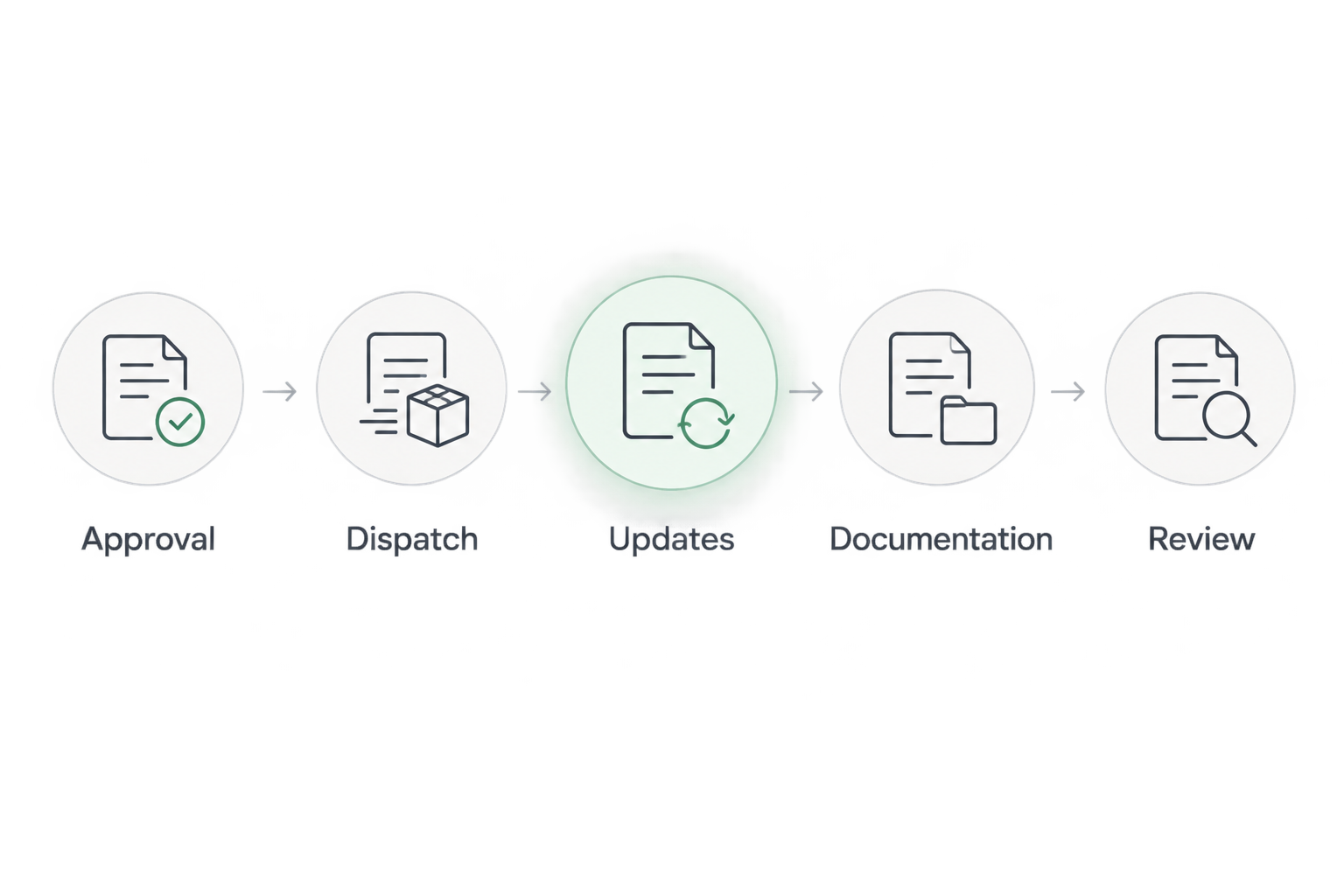
Keep 2 review checkpoints in this procedure: approval before dispatch and reconciliation after documentation returns. These are recommended controls, not statutory requirements or a guarantee that service is legally sufficient.
For a 2026 file review, retain event dates separately from data-entry dates. If an update arrives later, the date someone entered it should not replace the date of the reported event.
Read the guide to what counts as proof of service in California before standardizing your document-review checklist. Use documentation appropriate to the actual assignment rather than assuming every delivery uses the same form.
Revised notice workflow
A revised notice needs a new approval decision, not a silent file replacement. This adjacent workflow is best for matters where authorized reviewers change the packet after the original dispatch.
| Workflow | Best for | Advantage | Limitation |
|---|---|---|---|
| Initial approved dispatch | A finalized notice not yet assigned | Establishes a clear starting packet | Later changes require another controlled handoff |
| Revised notice dispatch | An approved change after assignment | Makes the replacement explicit | Requires reconciliation with any work already performed |
- Request a hold. Notify the provider that the existing assignment needs review and request acknowledgment. Do not assume the hold took effect merely because your message was sent.
- Establish what happened. Ask whether any attempt or delivery occurred before the hold was acknowledged. Preserve that history even if the packet changes.
- Approve the replacement. Have the authorized reviewer approve the revised notice and any revised instructions. Give the replacement a distinct version identifier.
- Reissue explicitly. Identify the superseded packet, replacement packet, and instructions for the existing assignment. Confirm whether the provider needs a replacement request or a new assignment.
- Reconcile the record. Keep both versions and the hold acknowledgment, with a clear note explaining which documents relate to which reported events.
Expected result: Everyone knows which notice is authorized for delivery, and the file preserves events involving the earlier version. Counsel decides the legal effect of any earlier attempt or service.
For your 2026 revision procedure, prohibit silent overwrites. A corrected document does not change what was previously sent or delivered.
Troubleshooting
The packet has the wrong unit or recipient
Place the assignment on hold and obtain corrected approval. Identify the mismatch precisely, preserve the original dispatch record, and request acknowledgment of the hold. If activity already occurred, send the facts to the legal reviewer instead of treating the correction as retroactive.
The provider received duplicate requests
Reconcile the references before authorizing more work. Compare the tenancy, recipient, notice version, and dispatch history, then identify the active assignment in writing. Keep the duplicate record with its disposition rather than deleting the evidence of the mix-up.
An attempt is mistaken for completed service
Restore the status to the reported event and request clarification. An unsuccessful visit, access problem, or unanswered door is not the same entry as completed service. Ask for the provider's factual update and keep legal conclusions with the responsible reviewer.
Returned documentation does not match the packet
Stop administrative closure and ask the preparer to review the discrepancy. Specify the incorrect name, address, document reference, or date. Do not alter signed documentation yourself, and do not calculate a new legal deadline from an unresolved mismatch.
Your team cannot find the latest instructions
Rebuild a single assignment record before sending another message. Gather the approved packet, dispatch acknowledgment, holds, revisions, and updates under the request reference. Name the active contact and document version so the next instruction does not create another conflicting thread.
Customize your workflow
Expand the workflow around exceptions before adding automated messages. Golden Hill Legal Runner LLC offers standard, rush, same-day, and skip-tracing legal document delivery across San Diego County; confirm the scope and instructions for your particular assignment rather than assuming a service category establishes a legal outcome.
Best for straightforward, approved assignments: Use the controlled manual handoff described here. It gives your team an explicit approval record, but it still requires staff to enter updates and check returned documentation.
Best for changed or disputed instructions: Use the revised notice workflow. It preserves version history, but acknowledgment and reconciliation add administrative work. Do not remove those controls merely to shorten the task list.
Before adopting the procedure in 2026, run 3 test scenarios with fictional information: an initial dispatch, a revision after dispatch, and an unsuccessful attempt. Confirm that each scenario leaves a readable record without sending real documents or exposing tenant information.
Then assign ownership for unresolved exceptions. Someone must follow up on missing acknowledgment, conflicting instructions, and documentation that never returns; a status field cannot take responsibility for the file.
Arrange eviction document service
Discuss your approved documents, service address, and requested timing for a San Diego County assignment.
FAQ
What's the safest way to organize a DoorLoop eviction notice service workflow?
Use an approved-document handoff, written assignment acknowledgment, a factual status ledger, and review of returned documentation. Keep legal approval separate from dispatch and do not treat a software status as proof of service.
Does this workflow require a native DoorLoop integration?
No. This workflow uses a controlled manual handoff and does not depend on a native integration, automatic dispatch, or synchronized service statuses.
Can I treat an emailed eviction notice as completed service?
Do not treat an outgoing email as proof that legally required service is complete. Have counsel confirm the permitted method for the specific notice and preserve documentation of the actual delivery events.
What should I send with an eviction notice service request?
Send the approved notice, recipient information, complete service address, request reference, relevant access instructions, and an authorized contact. Share only information needed for the assignment through an approved channel.
What happens if I change the notice after dispatch?
Request a hold, confirm what activity already occurred, and obtain approval for the replacement packet. Reissue the instructions explicitly and preserve both versions with their associated events.
Does Golden Hill Legal Runner LLC provide legal advice about eviction notices?
No. Golden Hill Legal Runner LLC is a process serving company, not a law firm, and provides no legal advice. Have an attorney or qualified legal resource address notice selection, legal sufficiency, and deadlines.
Is serving an eviction notice the same as serving an eviction lawsuit?
No. A prefiling notice and a filed eviction lawsuit are different assignments. Confirm the documents, instructions, and documentation requirements separately rather than reusing an earlier packet.
One last thing
Close the assignment from reviewed evidence, not from a green status indicator. Before marking the administrative work complete, check that another authorized person can identify the approved notice, dispatch instructions, reported delivery events, and returned documentation from the record alone.
That handoff test exposes missing information while the people involved can still resolve it. It also keeps a tidy property-management record from being mistaken for a legal determination.
Related guides
- Process serving for eviction attorneys: complete workflow
- What happens if a tenant refuses an eviction notice
- Can a process server enter private property?
Ready to get papers served? Book online with a registered process server in San Diego.