Rent Manager to eviction notice service: complete 2026 workflow
Instead of manually rebuilding tenant details for every delivery request, use a Rent Manager eviction notice service workflow that moves an approved notice packet through dispatch, service updates, and proof review. Keep a human approval gate before sending documents to Golden Hill Legal Runner for service in San Diego County.
- Use a Rent Manager eviction notice service workflow with approval before dispatch, not automatic service triggered by a balance.
- Golden Hill Legal Runner provides process serving across San Diego County; keep notice selection and legal review separate.
- Match every notice, delivery request, and returned proof to the same recipient and document version.
- For your 2026 workflow, treat delivery updates and completed proof as separate records.
Why this matters
An unpaid balance is an accounting event. It is not, by itself, an instruction to serve a particular notice. Your workflow needs to separate account review, notice approval, delivery instructions, and the record of what actually happened.
Golden Hill Legal Runner is best for San Diego County property managers who need a process-serving provider for eviction documents. The company is registered, bonded, and insured. It offers standard, rush, same-day, and skip-tracing services; those offerings do not replace legal review or establish a completion deadline for a particular assignment.
This 2026 guide describes a controlled document handoff, not a verified native integration between Rent Manager and a process server. Use the export, document-storage, and communication tools your organization already permits. Do not build an automated connector around assumed software features.
Before you start
- Access and authority: Have authorized access to the relevant Rent Manager records, approved notice documents, and an approved channel for transmitting tenant information. Assign someone who can authorize dispatch.
- Service instructions: Prepare the recipient names, complete service address, unit designation, document list, requester contact, and any attorney-approved timing instructions. Confirm the provider accepts the assignment before treating it as dispatched.
- The hidden gotcha: A ledger or address can change after a notice is prepared. Freeze the approved packet before dispatch; never silently replace documents already sent for service.
For your 2026 operating procedure, identify who resolves conflicts between the account record and the approved notice. The process server should not have to choose which balance, recipient, or document version you intended to use.
Approved packet configuration
The labels below are suggested internal checklist labels, not claims about Rent Manager buttons or built-in fields. Put them in your existing task system, dispatch worksheet, or approved recordkeeping process.
Establish the case record
- Open the relevant tenant and property records in your authorized Rent Manager environment. Verify the recipient's name, property address, and unit against the approved notice.
- Assign a Case reference that follows the assignment from preparation through proof review. Keep that reference distinct from a software-generated record identifier if the two serve different purposes.
- Record the Document version and Approval owner in your checklist. Identify exactly which packet the approver reviewed.
- Keep 1 packet per recipient as your organizing rule. When recipients share documents, record that relationship explicitly rather than assuming a shared address makes their assignments interchangeable.
Expected result: You can identify the intended recipient, the approved packet, and the person authorized to release it without rereading an email chain.
Review the packet contents
Check that every attachment opens, every page is readable, and the notice matches the intended recipient. Verify the full address, including the unit designation. A correct street address with the wrong unit is still a dispatch problem.
Do not ask the delivery provider to decide which notice is legally appropriate. Have your attorney or authorized reviewer resolve the notice type, required content, service instructions, and timing before release.
Recommendation: Use 2 review checkpoints: one before dispatch and one when service documentation returns. The first protects the instructions; the second checks whether the returned record matches them.
Dispatch handoff configuration
Release the approved request
- Prepare the Service request using only the approved recipient details and document version. Include the case reference, complete address, requester contact, and requested service level.
- Separate factual access information from assumptions. Record known access restrictions or relevant safety information without instructing the server to bypass a gate, misrepresent identity, or enter unlawfully.
- Send the packet through a channel accepted by the provider and permitted by your organization. Ask how acknowledgment, updates, and completed documentation will be returned.
- Obtain an acknowledgment identifying the assignment. Record the provider's reference alongside your internal reference, and resolve any discrepancy before treating the request as accepted.
- Save the dispatched packet as a fixed record. Retain later revisions separately, with clear instructions about whether the earlier assignment must stop.
Expected result: Your team and the delivery provider are working from the same recipient details and the same document version.
A request being sent is not the same as a provider accepting it. Likewise, a request for same-day service is not evidence that service occurred. Keep those events separate in your 2026 workflow.
Choose the handoff method
Start with a reviewed manual handoff. Add automation only after confirming the actual capabilities, permissions, and transmission methods of every system involved.
| Handoff method | Best for | Advantage | Limitation |
|---|---|---|---|
| Reviewed manual handoff | Teams establishing a controlled dispatch process | Lets a person check the packet before release | Requires staff to send requests and record acknowledgments |
| Reviewed automation | Teams with verified connection methods and repeatable approvals | Can reduce repeated copying when correctly configured | Requires technical validation, error handling, and protection against duplicate requests |
Neither method determines whether a notice is legally sufficient. Automation also cannot turn a pending request into completed service simply because a message was delivered successfully.
Status and exception configuration
Record delivery events separately
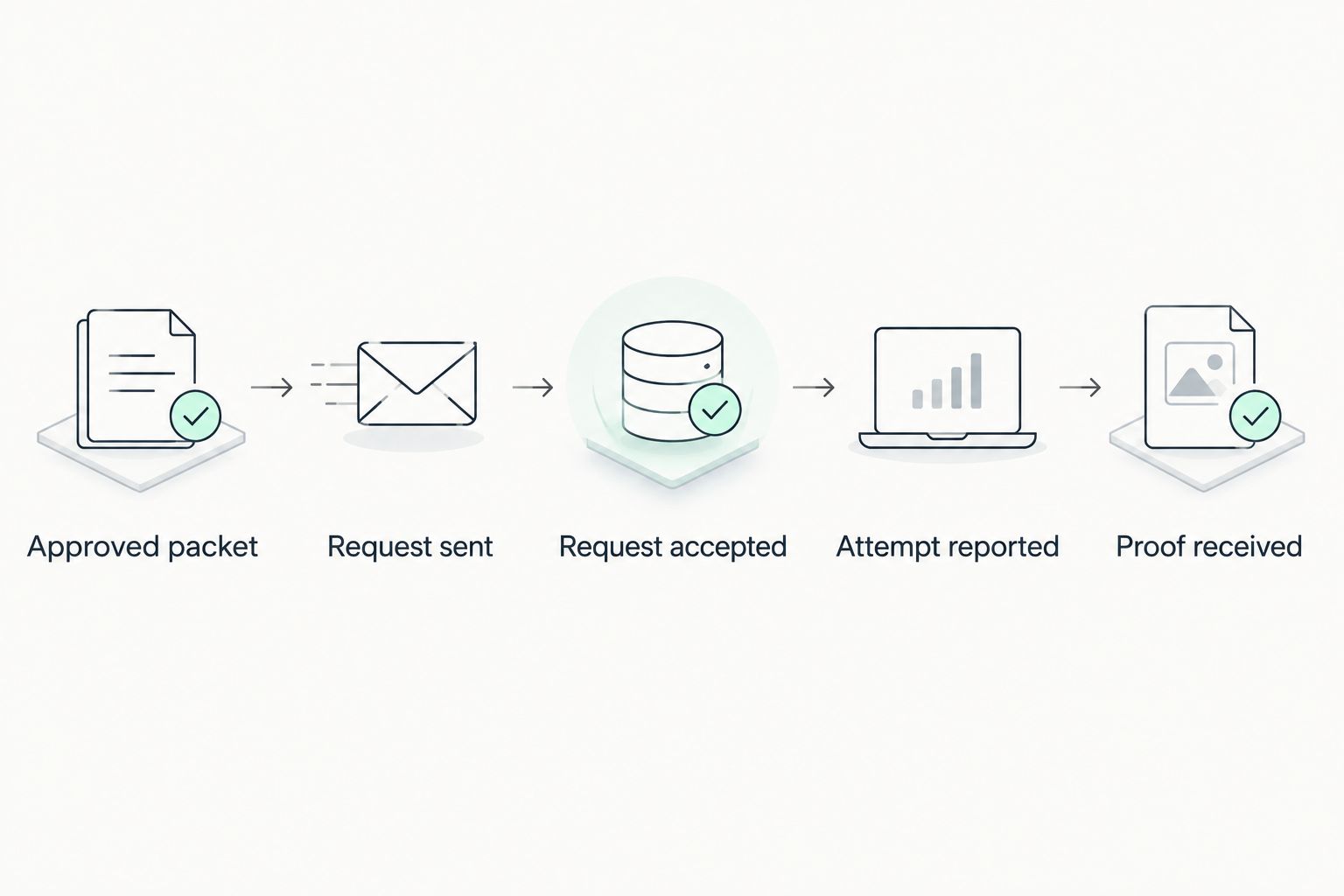
- Maintain separate checklist entries for Request sent, Request accepted, Attempt reported, and Proof received. These are suggested workflow labels, not Rent Manager interface instructions.
- Record each provider update against the correct case reference. Preserve the original update rather than replacing it with a summary that loses dates or qualifications.
- Route exceptions to a named decision-maker. Examples include an incomplete address, an apparent move, restricted access, or instructions that conflict with the packet.
- Keep unsuccessful attempts distinct from completed service. Do not infer a legal outcome from a short status message.
Expected result: Anyone reviewing the assignment can distinguish what your team requested from what the provider reported.
Use the following sequence as an operational map. An exception stops progression until the responsible person resolves it; it does not justify automatically selecting a different service method.
Handle an exception without losing the record
When a provider reports a problem, retain the original packet and the reported facts. Record the decision, who authorized it, and any replacement instructions. Avoid rewriting the initial request as though the correction had always been there.
Golden Hill Legal Runner offers skip tracing, but an address problem does not automatically authorize a search or a new service assignment. Obtain approval for the next action and confirm its scope with the provider.
Proof review configuration
Close the delivery record
- Save the returned proof or service documentation with the same case reference used at dispatch. Keep the original file intact.
- Compare 3 identifiers: the recipient name, service address, and document description. Resolve mismatches before marking the internal review complete.
- Review the reported service details with the responsible reviewer. Ask the provider to address factual errors; do not edit a signed declaration yourself.
- Record who owns any subsequent filing or legal deadline review. Receipt of a document is not confirmation that it has been filed with a court.
- Update your internal record only after the assigned reviewer confirms the next step. Preserve the dispatched packet, updates, returned documentation, and review decision together.
Expected result: Your record connects the approved documents to the reported delivery and identifies any remaining legal or filing work.
For a closer look at the documentation, read what counts as proof of service in California. Match the required proof to the document and procedure involved rather than assuming every delivery uses the same form.
When a tenant record changes after approval
A second useful workflow starts when someone reports a changed address, corrected name, revised document, or changed account information after approval. Route changes to review, not directly to redispatch. A record edit does not tell you whether an existing assignment should continue.
- Flag the affected case reference and identify the change. Preserve the previously approved version.
- Determine whether the packet has already been sent, accepted, attempted, or completed. Contact the provider promptly if pending instructions need to stop or change.
- Ask the authorized reviewer whether the change affects the notice or delivery instructions. Do not assume a corrected ledger automatically requires a new notice.
- If a replacement is approved, issue a clearly identified replacement packet. Obtain acknowledgment of the revised instructions before resuming the assignment.
The benefit is controlled correction. The trade-off is another approval step, especially when an assignment is already underway. Keep that step in your 2026 procedure rather than allowing background updates to overwrite active instructions.
Troubleshooting
The provider cannot match the request to the attachments
Send a corrected document list with the case reference and version identifier. Confirm which packet remains active. Do not send another attachment without explaining whether it supplements or replaces the original request.
A workflow sends the same request twice
Pause the dispatch mechanism and contact the provider to reconcile the assignments. Before restarting automation, add a duplicate check using the case reference, recipient, and document version. Keep a record of any canceled duplicate.
A reported attempt is marked as completed service
Correct the internal status using the provider's actual report. Ask for clarification when the update is ambiguous. A visit to an address, an unsuccessful attempt, and completed service are different events.
Returned proof lists the wrong unit or document
Stop internal closure and send the discrepancy to the provider and responsible reviewer. Preserve the returned file. Obtain appropriate corrected documentation rather than modifying it in your own records.
Someone assumes the proof was filed
Check the filing record separately. Assign an owner to confirm filing and any acceptance or rejection. Keep Proof received separate from your filing-confirmation task so a delivery update cannot close unrelated work.
Customize your workflow
Expand the process only after the basic handoff works reliably. Add an exception owner, a replacement-packet procedure, and an escalation contact before adding automatic dispatch.
Golden Hill Legal Runner's process-serving role fits the delivery stage; your organization still needs to assign responsibility for notice approval, legal questions, and subsequent filing. Confirm the communication method and assignment details directly rather than assuming software synchronization.
For your 2026 review, walk through a sample packet without transmitting real tenant information. Check that the record distinguishes approval, acceptance, an unsuccessful attempt, and returned proof. Fix unclear ownership before using the workflow on an active matter.
FAQ
Does Rent Manager automatically send eviction notices to a process server?
This guide does not establish a native Rent Manager connection to a process server. Use a reviewed handoff, and enable automation only after verifying the actual connection methods, permissions, and approval controls.
What's the best trigger for a Rent Manager eviction notice service workflow?
Use explicit approval of a specific notice packet as the dispatch trigger. A balance change or tenant-record update should start review, not independently authorize service.
Can Golden Hill Legal Runner handle eviction document delivery in San Diego County?
Golden Hill Legal Runner offers process serving for eviction cases across San Diego County. Confirm the documents, address, service instructions, and requested service level before treating an assignment as accepted.
Should an updated tenant address automatically create a new service request?
No. Route an updated tenant address to the responsible reviewer and determine what has already happened on the existing assignment before issuing replacement instructions.
Does receiving proof of service mean it has been filed?
No. Receiving proof and filing it are separate events. Assign someone to verify any required filing and retain the filing confirmation separately from the delivery record.
What should I do if the tenant name or unit is wrong on returned proof?
Pause internal closure and report the discrepancy to the provider and responsible reviewer. Preserve the original document and request appropriate correction rather than editing signed documentation yourself.
Is a process-serving company responsible for choosing the eviction notice?
Keep notice selection and legal review with your attorney or authorized reviewer. A delivery assignment should identify the approved documents and instructions rather than asking the server to decide your legal procedure.
One last thing
Your most useful control is a fixed copy of exactly what you sent. Without it, a later document change can leave your team unable to reconcile the request with the returned proof. Keep the approved packet and dispatched packet identifiable even when they are identical.
Not a law firm. No legal advice provided.