Small claims filing to process server: complete 2026 workflow
Instead of manually chasing filed papers, delivery updates, and court receipts, use a small claims process server San Diego workflow that moves each case through document checks, service instructions, proof review, and filing confirmation. Filing starts the case; completed service and court-filed proof are separate milestones.
- The small claims process server San Diego workflow starts with court-issued papers, not an unfinished claim.
- Golden Hill Legal Runner serves San Diego County small claims documents; confirm instructions before assigning delivery.
- California small claims service deadlines depend on the defendant’s location and the service method.
- Review proof of service and confirm court filing; a delivery update does not complete both tasks.
Why this matters
A small claims case can stall between filing and the hearing when nobody owns the service deadline or proof filing. Your workflow needs separate checkpoints for papers ready, assignment accepted, service completed, and proof filed. An email saying the documents were delivered does not establish that the court has received proof.
Golden Hill Legal Runner is best for San Diego County small claims litigants who need a registered, bonded, and insured document-delivery provider. The company offers standard, rush, same-day, and skip-tracing services. Start with Golden Hill Legal Runner to discuss your assignment; keep responsibility for court requirements explicit.
This 2026 guide covers the operational handoff, not case strategy. Golden Hill Legal Runner is not a law firm. No legal advice provided.
Before you start
- Have court-issued papers and hearing information. Keep the filed claim, any documents the court directs you to serve, the case number, hearing date, and court location together. Do not send an unsigned draft as though it were the court-issued packet.
- Have recipient information and a filing owner. Prepare the defendant’s name, service address, relevant access instructions, and your contact details. Decide who submits proof to the court and who checks acceptance; these are separate from physical delivery.
- Check the service deadline before selecting speed. California Courts’ small claims service guidance distinguishes personal and substituted service. Personal service generally must occur at least 15 days before the hearing for a defendant in the county, or 20 days outside it; substituted service requires additional time. Confirm the rule for your case with the court or small claims advisor.
For your 2026 case, record the confirmed deadline as an actual calendar date. Do not let a service label replace deadline planning: same-day delivery does not change the court’s requirements.
Filed papers
Create one authoritative packet before sending instructions. Keep drafting, filing, and service versions separate so the server receives the documents the court issued.
- Collect the issued claim. For a California plaintiff’s claim, identify Judicial Council form SC-100, Plaintiff’s Claim and ORDER to Go to Small Claims Court, and include the issued version. Follow the court’s directions for additional documents.
- Check the case identifiers. Compare the case number, plaintiff name, defendant name, hearing date, and court location across the packet. Stop the handoff if a page belongs to another case or an older hearing date.
- Check readability and completeness. Open the actual files you intend to send. Confirm that pages are legible, attachments are included, and the packet contains no unrelated correspondence or private notes.
- Name the working files clearly. Use a naming convention that identifies the case and document status. Mark superseded copies separately rather than leaving several indistinguishable versions in the same folder.
- Record the packet owner. Assign one person to approve replacements if the court issues revised papers. That person should tell the server when a previous packet must no longer be used.
Expected result: You have a readable, court-issued service packet and a named person responsible for document changes. The server does not have to guess which attachment controls.
Service request
Use a written assignment checklist. The labels below are suggested headings for your own handoff record, not names of buttons or fields in a provider portal.
- Record Case details. Include the case number, court, hearing date, and your confirmed service deadline. Distinguish the hearing date from the last date for service.
- Record Recipient details. Supply the defendant’s name and the address you want checked. For a business defendant, resolve questions about the proper recipient with the court or small claims advisor before giving instructions.
- Record Address notes. Include relevant gate access, business hours, unit information, and known address uncertainty. Identify unverified information as unverified; do not present an old address as current.
- Record Service instructions. State the requested urgency, attach the approved packet, and identify the contact authorized to approve changes. Ask the server to flag instructions that cannot be completed as written.
- Record Proof responsibility. Confirm who prepares the proof, who submits it, and who checks court acceptance. Request acknowledgment of the assignment and the packet received.
Expected result: The assignment has a clear recipient, approved papers, a calendar deadline, and a proof-filing owner. Sending an email alone is not confirmation that the assignment has been accepted.
Choose the service route
Golden Hill Legal Runner offers the following services. Use this comparison to frame the request, not to assume a completion guarantee or a particular number of attempts.
| Service route | Best for | Operational benefit | Limitation |
|---|---|---|---|
| Standard | Cases with time remaining before the confirmed deadline | Lets you request ordinary service handling | Does not replace checking the court’s deadline |
| Rush | Cases requiring priority attention | Communicates urgency at assignment | A priority request does not guarantee completed service |
| Same-day | Cases needing a same-day service request | Makes the requested timing explicit | Recipient access and valid service still matter |
| Skip tracing | Cases with an uncertain or outdated address | Addresses a location problem before another delivery attempt | Address research is not completed service |
Choose the route by deadline and address quality, not by the hearing date alone. Confirm the assignment’s terms directly, including how updates and unsuccessful attempts will be communicated.
Proof review
Review the server’s report against the papers and the case record. Your review checks consistency; it does not replace the server’s declaration or the court’s decision about valid service.
- Separate attempts from completed service. Record an unsuccessful visit as an attempt. Keep a successful-service update distinct from the completed proof document.
- Check the proof form. California small claims cases use Judicial Council form SC-104, Proof of Service, when applicable. Follow current court instructions and use any additional documentation required for the service method.
- Compare the identifiers. Check the case number, person served, documents served, service date, and location against the assignment. Raise discrepancies with the server before submission.
- Check completion and signature. Review whether the applicable sections are completed and the declaration is signed. The person declaring the service facts must correct their own errors; do not rewrite those facts yourself.
- Escalate a deadline problem. If the reported date appears outside the confirmed service window, contact the court or small claims advisor about next steps. Do not treat a completed delivery as a cure for late service.
Expected result: You have a completed proof document that matches the assignment, or a specific correction request with an owner. The case record distinguishes attempted delivery, completed service, and proof received.
Court filing
Finish the handoff by confirming that proof reached the court through the permitted filing method. For your 2026 case, check the court’s current instructions rather than reusing another case’s filing setup.
- Confirm the filing method. Check how the assigned court accepts small claims proof of service. Do not assume an electronic filing route used for a different case type applies here.
- Submit the reviewed proof. California Courts’ small claims guidance instructs filers to file proof of service at least 5 days before the hearing. Confirm the requirement and filing procedure for your case.
- Save the submission record. Keep the receipt or other evidence of submission with the proof. A submission receipt and an accepted filing are different records when the filing system distinguishes them.
- Check acceptance. Review the court response or case record using the court’s available method. Address rejection notices rather than marking the task complete because you uploaded a file.
- Close the checklist. Record who verified acceptance and where the filed proof is stored. Keep the service report and related correspondence with the case materials.
Expected result: Your record shows proof submitted and acceptance checked, with any unresolved issue assigned to a person. The workflow closes on court confirmation, not the server’s final update.
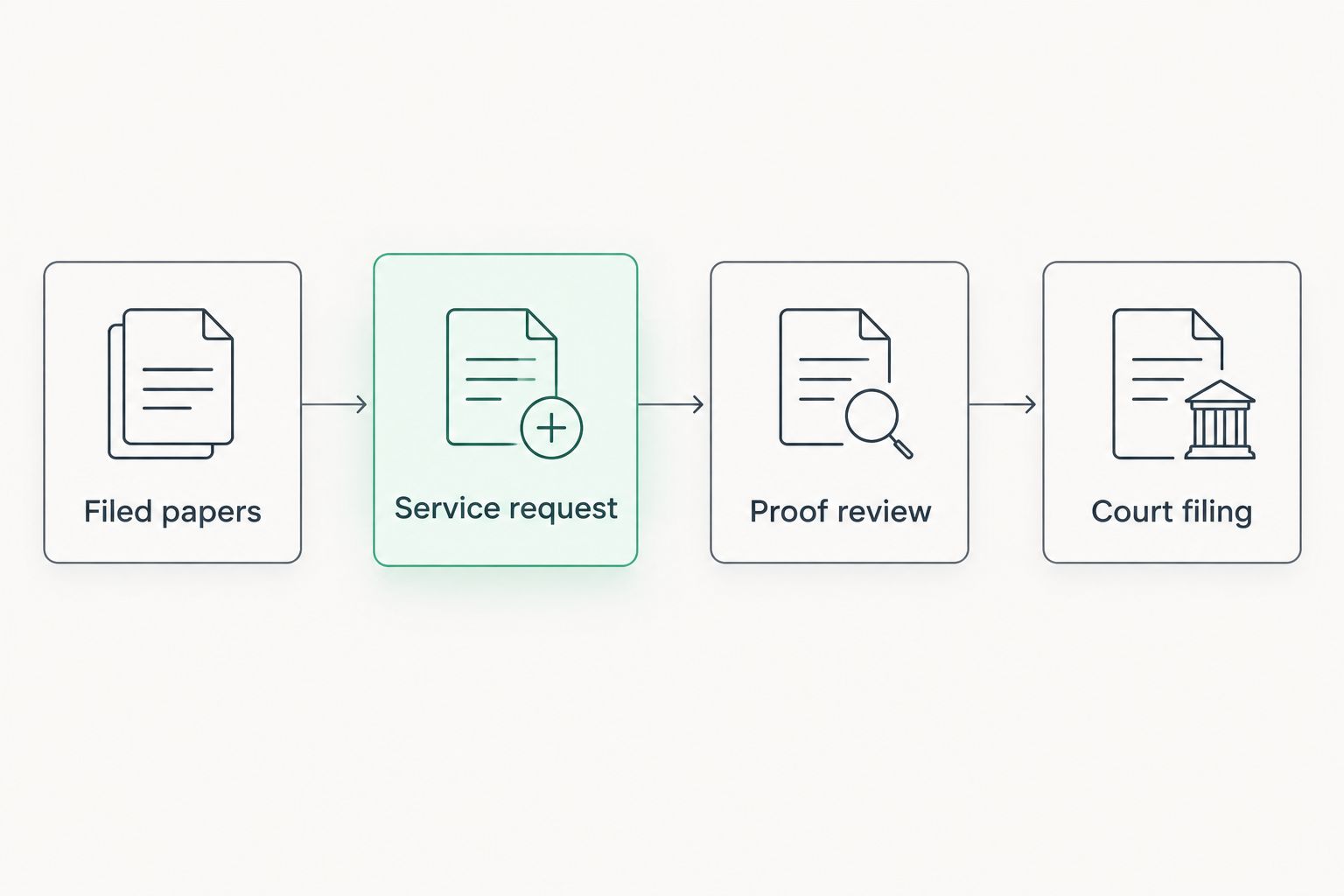
The complete sequence is Filed papers, Service request, Proof review, then Court filing. Each stage needs its own completion evidence.
When the hearing date or address changes
Use a change-controlled version of the same workflow whenever the court changes the hearing or you receive better recipient information. An update should trigger a review, not an automatic duplicate assignment.
- Pause conflicting instructions. Tell the server what changed and ask whether an attempt or completed service has already occurred. Do not assume a sent message stopped work.
- Identify the controlling documents. If the court issued revised papers, separate them from the superseded packet. Confirm with the court or small claims advisor what must be served after the change.
- Recheck the deadline. Enter the revised hearing date and the confirmed service deadline. Keep the earlier dates in the case history, not in the active instructions.
- Confirm the replacement assignment. Send the revised packet or corrected address with a clear change summary. Obtain acknowledgment before treating the instructions as updated.
- Reconnect proof and filing. Ensure any resulting proof describes what actually happened. Review court-filing tasks again rather than carrying forward a completion status from the earlier version.
Expected result: One active assignment reflects the current instructions, while the history preserves earlier attempts and document versions.
Troubleshooting
The server received draft papers
Replace the packet before further work. Send the court-issued documents and identify the earlier version as superseded. Ask the server to confirm what was received and whether any delivery has already occurred; seek court guidance if draft papers were delivered.
The recipient cannot be found at the address
Resolve the address problem instead of repeating the same instruction. Review the attempt information, confirm spelling and unit details, and assess whether address research is needed. Skip tracing does not itself complete service or extend the deadline.
The defendant is a business
Confirm the proper recipient before sending the server out. A trading name, business address, and authorized recipient are not interchangeable. Ask the small claims advisor or court resources how the defendant’s entity type affects your instructions.
Substituted service leaves less time than expected
Recheck the full timing requirement immediately. California Courts’ small claims guidance adds 10 days to the service window for substituted service and requires mailing as part of that method. Ask the server for the actual delivery and mailing details, then confirm the deadline implications with the court or advisor.
Proof was returned but the court has no filing
Find the filing owner and submission record. A server’s completed proof is not evidence that someone submitted it. If a filing was rejected, resolve the stated issue and verify the subsequent court response.
Customize your workflow
For a single case, a checklist and an organized case folder can keep the handoff clear. For repeated assignments, maintain a shared register with case number, recipient, hearing date, confirmed deadline, packet version, service status, proof status, and filing owner.
Use operational statuses rather than vague notes such as pending. Separate Awaiting papers, Assignment accepted, Service attempted, Service completed, Proof received, and Filing checked. These are your internal tracking labels, not promised provider features.
Keep sensitive case materials in an access-controlled location. Send only information relevant to the assignment, and confirm the provider’s accepted submission channel before transmitting documents.
Golden Hill Legal Runner provides process serving for small claims cases across San Diego County. The small claims process-server guide supports provider selection; this workflow keeps the assignment and court follow-through separate.
Arrange your small claims service
Discuss your filed documents, recipient information, and required timing.
FAQ
What is the small claims process server San Diego workflow?
The workflow is to collect court-issued papers, confirm the service deadline, assign delivery, review proof, and verify court filing. Keep completed service and accepted proof filing as separate milestones.
Can I serve my own small claims papers in California?
No. California Courts’ small claims guidance requires a server who is at least 18 years old and is not a party to the case. A registered process server is an option for completing that task.
How far before the hearing must small claims papers be served?
California personal-service deadlines generally require service at least 15 days before the hearing for a defendant in the county, or 20 days outside it. Substituted service requires additional time; confirm the applicable deadline with the court or small claims advisor.
Does same-day service guarantee that my case is ready for court?
No. A same-day service request does not guarantee completed service, compliance with the deadline, or court acceptance of proof. Track each requirement separately.
Who files the proof of service in a small claims case?
Assign proof filing explicitly before delivery begins. Confirm whether you or the provider will submit it, and name the person responsible for checking court acceptance.
What should I do if the defendant’s address is wrong?
Correct the address problem before repeating the delivery instruction. Golden Hill Legal Runner offers skip tracing, but address research is separate from service and does not change court deadlines.
What happens if the court changes my small claims hearing date?
Review the service instructions, documents, and deadline again. Confirm with the court or small claims advisor what the change requires, then obtain acknowledgment of any revised assignment.
Is Golden Hill Legal Runner a law firm?
No. Golden Hill Legal Runner is a registered, bonded, and insured process serving company serving San Diego County. Not a law firm. No legal advice provided.
One last thing
Do not use delivered as your final case status. A successful handoff still leaves proof review and court filing to complete. For every 2026 small claims assignment, require a final record showing who checked filing acceptance and where the proof is stored.
Keep the provider’s service report, signed proof, and court response together. That gives you a traceable record without confusing what the server completed with what the court received.
Not a law firm. No legal advice provided.