CASEpeer to proof of service: complete 2026 workflow
Instead of manually chasing service updates across emails and case notes, use a CASEpeer proof of service workflow that connects an approved document packet, a confirmed service assignment, and a reviewed proof. This 2026 guide sets out a staff-managed handoff, with separate checks for service completion and court filing—not a claimed native integration.
- Use a CASEpeer proof of service workflow with separate assignment, service, proof review, and filing checkpoints.
- Golden Hill Legal Runner provides process serving across San Diego County; keep case management and service delivery responsibilities distinct.
- Match every returned proof to the recipient, document version, and actual service details before closing the assignment.
- Treat court filing acceptance as a separate record from the signed proof of service.
Why this matters
A document leaving your office is not evidence that service occurred. A service update is not the signed proof, and a signed proof is not confirmation that the court accepted a filing. Keep those events separate in your case record.
Golden Hill Legal Runner process serving is best for attorneys and legal staff needing document delivery across San Diego County. Golden Hill Legal Runner is registered, bonded, and insured, with standard, rush, same-day, and skip-tracing services. Assign the delivery work separately from your firm's legal review and filing responsibilities.
For your 2026 procedure, define completion before sending anything: the correct recipient was served, the returned proof was reviewed, and any required filing was handled by the assigned person. Do not let a single completed task stand for all those events.
Before you start
- Access and materials: Have authorized access to the CASEpeer matter, the approved documents, the recipient details, and your firm's approved document-transfer method. Assign a staff member to manage the handoff and another person to cover absences.
- Instructions and ownership: Have the responsible attorney confirm the service requirements, applicable deadlines, recipient identity, and approved packet. Identify who will review the proof and who will handle any required filing.
- The gotcha: A replacement attachment does not automatically cancel a packet already sent for service. Require acknowledgment of any hold, replacement, or cancellation before treating an earlier instruction as withdrawn.
The labels below are suggested checklist labels, not CASEpeer button names or a description of a native connection. Use your organization's existing case-recording procedures; keep the substance of each checkpoint intact.
Matter record and approved packet
Prepare the assignment
- Confirm the matter. Match the case name, court, case number, and intended recipient against the approved documents. Resolve inconsistent names before dispatch rather than asking the server to interpret the discrepancy.
- Separate recipients. Use 1 recipient per assignment record as an internal tracking rule. A matter with multiple recipients needs separately traceable instructions and outcomes, even when the documents travel together.
- Check the packet. Open every attachment. Confirm that the packet contains the intended documents, readable pages, and any attachments identified in the instructions. Have the responsible attorney resolve questions about what must be served.
- Identify the approved version. Give the packet an unambiguous version reference in your assignment record. Include the actual approval date and distinguish the service copy from drafts, working notes, and earlier versions.
- Record deadlines distinctly. Write the attorney-confirmed service deadline, hearing date, and internal follow-up date as separate entries. Do not calculate a legal deadline from a general guide or substitute an internal reminder for the governing deadline.
Expected result: Your case record identifies the exact packet, recipient, responsible staff member, and attorney-confirmed instructions. Another authorized staff member can take over without reconstructing an email chain.
For a matter opened in 2026, use its actual dates throughout the packet history. A copied checklist should never carry dates or instructions from another case.
Build the instruction summary
Keep the operational summary short enough to check against the documents. Include the recipient's name, service address and unit, relevant access information, approved contact details, document list, urgency, and return instructions.
Separate verified information from leads. An address supplied by the client and an address confirmed through subsequent work should not appear as equally current facts without explanation. Share only information needed for the assignment through an approved channel.
Service handoff and acknowledgment
Send an assignment that can be confirmed
- Choose the service request. State whether you are requesting standard, rush, or same-day service. Golden Hill Legal Runner offers these process serving options; confirm the assignment details directly rather than treating an urgency label as a delivery guarantee.
- Transmit the approved packet. Use the agreed transfer method and include the version reference from your case record. Keep unrelated medical, financial, and case-strategy material out of the service packet unless the responsible attorney directs otherwise.
- Request acknowledgment. Ask for confirmation of the recipient, address, packet reference, requested urgency, and any deadline concerns. Sending a message establishes transmission, not acceptance of the assignment.
- Save the acknowledgment. Record who accepted the instructions and when. If the reply contains a question or qualification, resolve it before marking the assignment ready for attempts.
- Set the next follow-up. Assign a named staff member to check progress at an agreed point. Choose that point around the actual case needs; do not assume an automated update exists.
Expected result: Your record contains both the outgoing instructions and confirmation of what the server accepted. Any unresolved issue has an owner rather than sitting inside an unread reply.
The benefit of a staff-managed handoff is an explicit approval trail; the drawback is that someone must maintain it. CASEpeer and the service assignment do not become synchronized simply because both contain the same case number.
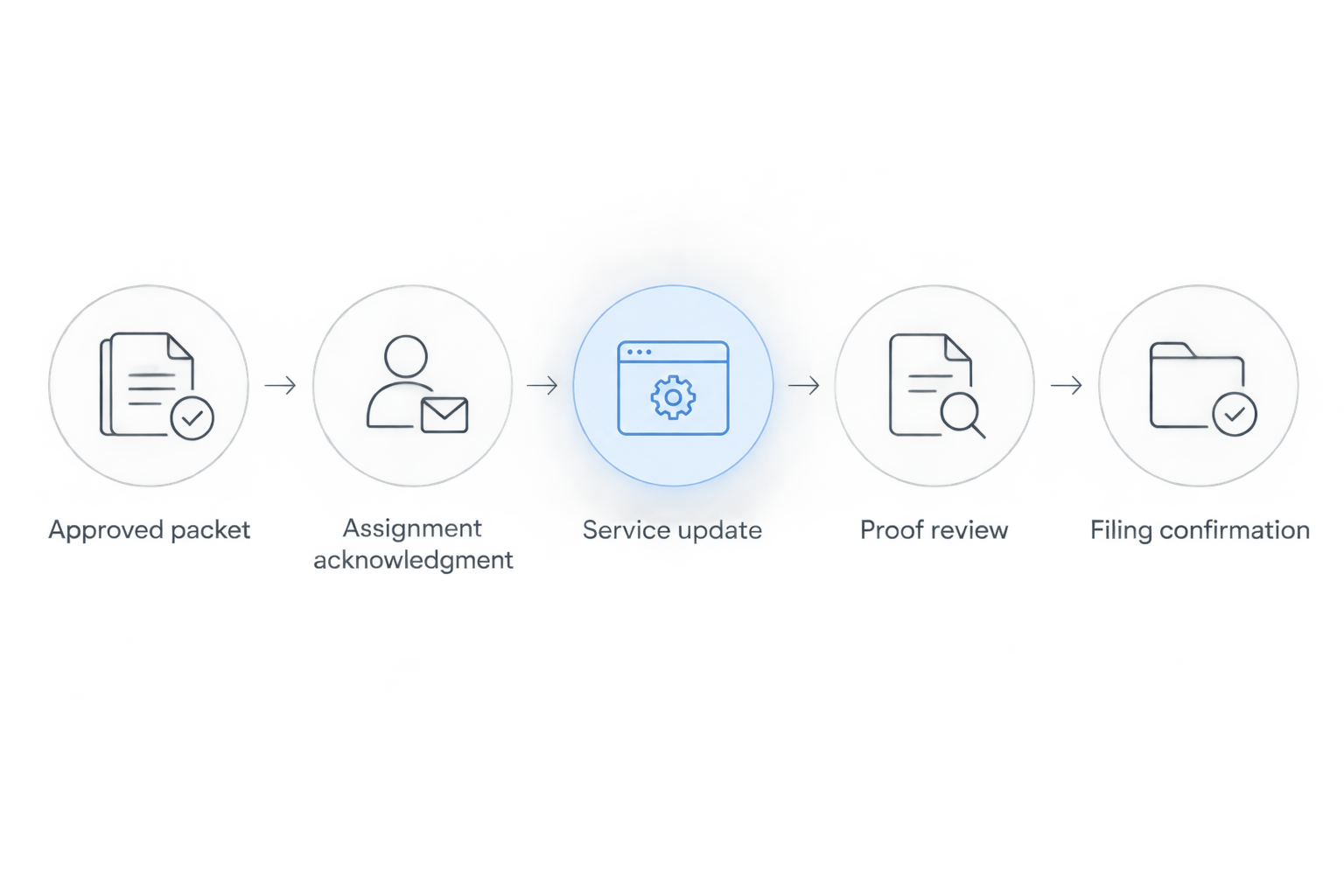
Keep the handoff stages distinct
Use these working labels in your checklist, or map them to your firm's existing terminology:
- Approved packet: The responsible person has authorized the documents for dispatch.
- Assignment acknowledgment: The server has confirmed the instructions received.
- Service update: The server has reported an attempt, an obstacle, or completed service.
- Proof review: Your designated reviewer is checking the returned document.
- Filing confirmation: The assigned filer has saved the applicable court response.
These are operational labels, not legal determinations. A status change should point to the supporting message or document, not replace it.
Attempt updates and exception control
Record events without changing their meaning
- Capture the reported event. Preserve the server's actual report, including the reported date, time, address, and outcome when supplied. Distinguish an unsuccessful attempt from completed service.
- Keep facts separate from conclusions. Record what the server reported without converting it into an unsupported statement about legal sufficiency. Route questions about the method or recipient to the responsible attorney.
- Escalate obstacles. Flag an incomplete address, inaccessible location, identity discrepancy, or changed instructions. Ask the responsible person to decide the next action rather than silently reusing the same request.
- Approve additional work explicitly. If an address problem calls for skip tracing or another assignment, document the authorization and scope. Golden Hill Legal Runner offers skip-tracing services, but a service request and an authorization for additional work are separate instructions.
- Preserve the timeline. Save corrections alongside the original report. Do not rewrite an earlier unsuccessful attempt so the record appears to show uninterrupted progress.
Expected result: Your CASEpeer matter has a readable service history with the original reports, open questions, and decisions attached to the correct assignment.
Use 2 review checkpoints in this workflow: packet approval before dispatch and proof review after the return. These are recommended internal controls, not statutory requirements. Keep attorney review available whenever an exception raises a legal question.
For your 2026 checklist, write escalation instructions around specific events, such as a disputed identity or replacement packet. A generic instruction to follow up does not tell covering staff what action is needed.
Proof return and filing record
Review the return before closing the task
- Match the assignment. Confirm that the returned proof belongs to the correct case and recipient. Compare it with the approved packet and service instructions, not merely the subject line of the return email.
- Check the recorded details. Review the document identification, reported service date and location, method, recipient information, and execution details applicable to that proof. Send omissions or inconsistencies back for correction by the appropriate person.
- Preserve the returned original. Keep the server's returned file intact. Request a corrected return when necessary; do not edit the server's factual declaration yourself.
- Obtain the required review. Have the designated reviewer confirm that the document is ready for the next step. An administrative check is not a substitute for an attorney's decision about legal sufficiency.
- Complete the filing handoff. If filing is required, send the reviewed proof to the assigned filer. Save the filing response and address any rejection separately from the service assignment.
Expected result: The matter contains a reviewed proof and a distinct filing outcome where applicable. Staff can tell whether the remaining work concerns the server's return, internal review, or the court submission.
Keep 3 records distinct: the service report, the signed proof, and the filing response. They answer different questions. The guide to what counts as proof of service in California explains the proof document in more detail.
When a packet or address changes
A revised assignment needs its own acknowledgment. Do not treat an updated CASEpeer note as notice to someone working from an earlier packet.
| Workflow variant | Best for | Benefit | Limitation |
|---|---|---|---|
| New assignment | An approved packet with settled instructions | Creates a clear starting record | Still needs acceptance and follow-up |
| Revised assignment | A changed packet, address, or instruction | Preserves the reason for the change | Needs confirmation that earlier instructions were withdrawn or replaced |
For a revision, first establish whether an attempt has already occurred. Then have the responsible attorney decide what the change requires. Send an explicit hold or replacement instruction through the agreed channel and obtain acknowledgment.
Keep the previous version in the history, marked as superseded rather than silently overwritten. Identify which version the server used for each reported event. Never assume replacement documents apply retroactively to an earlier attempt.
Troubleshooting
- The request was sent, but nobody confirmed it. Keep acknowledgment open. Contact the server through the agreed channel and confirm the actual assignment before recording it as accepted.
- The server has an older packet. Issue an explicit hold or replacement instruction, identify both versions, and request confirmation. Determine whether any attempt occurred before authorizing the next action.
- An unsuccessful attempt appears as completed service. Correct the internal status while preserving the original report. Assign the next decision instead of closing the service task.
- The proof conflicts with the attempt history. Stop the proof-review handoff and request clarification from the server. Do not resolve conflicting dates, addresses, or recipient details by editing the declaration.
- The proof was uploaded, but filing remains unresolved. Check the separate filing task and court response. A saved attachment is not filing acceptance; assign responsibility for resolving any rejection.
Customize your workflow
Build a reusable 2026 checklist around responsibilities, not software assumptions. Assign an owner for packet approval, dispatch, exception decisions, proof review, and filing follow-through. Name a backup for each responsibility.
If your firm introduces automation, start with internal reminders rather than automatic dispatch or closure. Test whether the intended recipient, approved version, and assignment reference remain correct. Keep human approval before releasing changed documents and before treating a return as reviewed.
Golden Hill Legal Runner handles process serving; your firm retains its own case-management and legal-review responsibilities. That separation keeps the handoff clear without suggesting that document delivery includes legal advice or court acceptance.
FAQ
How do I set up a CASEpeer proof of service workflow?
Use a documented handoff from approved packet to acknowledged assignment, service updates, proof review, and any required filing. Record the owner and supporting document for each stage.
Does this workflow require a native CASEpeer integration?
No. This guide uses a staff-managed handoff and does not describe a native CASEpeer integration. Use your firm's approved transfer and recording procedures.
Can I close the assignment when the server says the papers were served?
Keep proof review open until the returned document has been checked. A service update, a signed proof, and a filing response are separate records.
What should I do if the documents change after dispatch?
Send an explicit hold or replacement instruction and obtain acknowledgment. Confirm whether an attempt already occurred, and have the responsible attorney decide the next action.
Who should correct an error on the proof of service?
Request correction from the appropriate person responsible for the return. Do not independently change the server's factual declaration; preserve the original and the corrected version.
Does Golden Hill Legal Runner serve documents in San Diego County?
Yes. Golden Hill Legal Runner provides process serving across San Diego County, including standard, rush, same-day, and skip-tracing services. Confirm the instructions for each assignment directly.
Does saving the proof in CASEpeer mean it has been filed?
No. Saving a proof in the case record is separate from submitting it to court. Track any required filing and the resulting court response independently.
One last thing
Before closing a 2026 service assignment, ask a covering staff member to locate the approved packet, returned proof, and filing outcome without opening your inbox. If the handoff depends on your memory, the case record is unfinished.
Not a law firm. No legal advice provided.
Related guides
- Process serving for personal injury attorneys
- Submitting proof of service through California's eFileCA system
- Skip tracing to service of process
Ready to get papers served? Book online with a registered process server in San Diego.