File & ServeXpress to proof of service: complete 2026 workflow
Instead of manually reconciling File & ServeXpress submissions, process-server updates and signed proofs, use a case-level handoff checklist that tracks each record separately. This 2026 file and servexpress proof of service workflow takes you from the document packet to the returned proof and any required court filing without confusing electronic delivery with physical service.
- For file and servexpress proof of service, track electronic delivery, physical service and court filing separately.
- Golden Hill Legal Runner LLC fits San Diego County matters requiring physical process serving.
- Confirm the required service method before sending documents to either File & ServeXpress or a process server.
- Close the assignment only after checking the signed proof and any required filing acknowledgment.
Why this matters
A transmission record, a process server's signed proof and a court filing acknowledgment document different events. Your workflow needs the record that matches the service method required for that document and case.
Golden Hill Legal Runner LLC is best for attorneys, legal staff and individuals who need physical process serving in San Diego County. The company is registered, bonded and insured and offers standard, rush, same-day and skip-tracing services. Physical service remains a separate assignment from your electronic filing activity.
For your 2026 case checklist, use 3 checkpoints: the correct packet leaves your office, the required service is documented, and any required proof filing receives acknowledgment. Assign an owner to each checkpoint. A document upload alone does not close the loop.
This guide covers an operational handoff, not an automatic connection between File & ServeXpress and a process server. Do not design the workflow around an unconfirmed integration.
Before you start
- Accounts and access: Have authorized File & ServeXpress access for the relevant matter, your case documents and a person responsible for checking submission results. Confirm the current court-specific filing instructions before using the platform.
- Service materials: Prepare the recipient's name, usable address, document packet, case identification and deadlines supplied by your attorney or applicable court instructions. For physical service, identify who will authorize the assignment and receive updates.
- The gotcha: Electronic service is not a substitute for every form of physical service. Resolve the required method before submission; a platform receipt does not establish that a summons, restraining-order packet or other document was served by the legally required method.
Keep document handling separate from legal decisions. Your attorney or applicable court instructions determine the service method, deadline and appropriate proof. The process-serving assignment carries those instructions into the field.
Case record configuration
Establish the service requirements
- Identify the court, case number, case type and exact documents requiring service. Check that the packet belongs to the correct matter before preparing a filing or assignment.
- Record the required service method for each recipient. Do not assume everyone listed in the matter receives documents through the same channel.
- Record the source of the deadline and service instructions. Include the hearing date when relevant, but do not calculate a legal deadline from the hearing date without the applicable rule or attorney direction.
- Assign a case owner who can approve corrections, respond to address questions and review the returned proof.
Expected result: Your case record states what must be served, on whom, by which method and under whose direction. No one needs to infer those instructions from an email subject line.
Use 1 tracking row per recipient. Suggested columns are recipient, document version, required method, assignment reference, latest update, proof received and filing acknowledgment. These are fields for your own worksheet or case record, not claimed File & ServeXpress interface labels.
Separate the records
Keep at least 2 separate records when your matter includes electronic submission and physical service: the platform submission record and the process-serving assignment record. Add a proof-filing record when the proof must be filed.
| Workflow component | Best for | Useful evidence | Limitation |
|---|---|---|---|
| File & ServeXpress electronic submission | Managing supported electronic filing or service activity | The submission, delivery or filing records returned for that transaction | Does not replace physical service when that method is required |
| Physical process-serving assignment | Delivering documents by the instructed physical service method | Attempt updates and the completed proof or other applicable return | Requires recipient details, a usable packet and separate coordination |
| Proof filing | Placing the completed proof in the court record when required | The filing acknowledgment or rejection returned for the submission | Submission alone does not establish acceptance |
The components work together; they are not interchangeable alternatives. Label your saved records by function so a delivery confirmation cannot be mistaken for a court acceptance.
Document packet and submission configuration
Prepare the final packet
- Assemble the documents identified in the service instructions. Check every file for missing pages, unreadable scans and attachments referenced in the main document.
- Confirm whether the service packet needs court-issued or filed documents. Obtain the required version before handing off the assignment.
- Give the packet a clear internal version label. Keep the case number, recipient and document identity visible in your tracking record without placing unnecessary sensitive details in filenames.
- Retain the version actually transmitted. A later replacement must not silently overwrite your record of the earlier packet.
Expected result: Your office, the filing operator and the process server can identify the same document version. Corrections create an explicit change rather than an unexplained difference between files.
For your 2026 workflow, distinguish a draft from the final service packet in your own case record. The distinction is operational: it tells the person making the handoff whether the documents are ready for the instructed task.
Submit and preserve the response
- Open the relevant matter in your authorized File & ServeXpress account and follow the current court-specific submission process.
- Check the selected court, case identification, document classification and recipient information before completing the transaction.
- Save the resulting transaction reference and available acknowledgment in the case record. Record what the acknowledgment actually confirms rather than labeling every response as accepted.
- Check for a rejection or request for correction. If one appears, resolve the stated issue and preserve the relationship between the original transaction and the corrected submission.
Expected result: Your case record contains the submitted documents and a traceable platform response. The process-serving handoff uses the required document version, not an assumption that the filing succeeded.
Interface wording and available actions depend on the current account and court workflow. Follow the labels shown in your account; do not search for a supposed process-server connection based on this guide.
Physical-service handoff configuration
Send an actionable assignment
- Provide the recipient's full name and the address or addresses authorized for the assignment. Include useful access information without guessing about the recipient's location.
- Attach the final document packet and state the instructed service method. Identify any special handling instructions supplied by your attorney or the court.
- State the applicable deadline and the person authorized to answer questions. Identify urgent timing before the assignment begins.
- Request confirmation that the assignment instructions and packet were received. Record the assignment reference separately from the File & ServeXpress transaction reference.
- Agree on how updates and the completed proof will return to your office. Route them to the case owner rather than an unattended inbox.
Expected result: The process server has the documents, recipient information and instructions needed to act. Your office has a clear channel for status updates and corrections.
For San Diego County process serving, Golden Hill Legal Runner LLC offers standard, rush and same-day service, plus skip tracing. Match the requested service to your assignment needs and confirm the handling instructions directly. A service label is not a substitute for a case-specific deadline or an accepted assignment.
The advantage of this handoff is clear ownership of physical delivery. The trade-off is separate coordination: you still need to reconcile the server's updates with your filing record.
Track the assignment without overstating progress
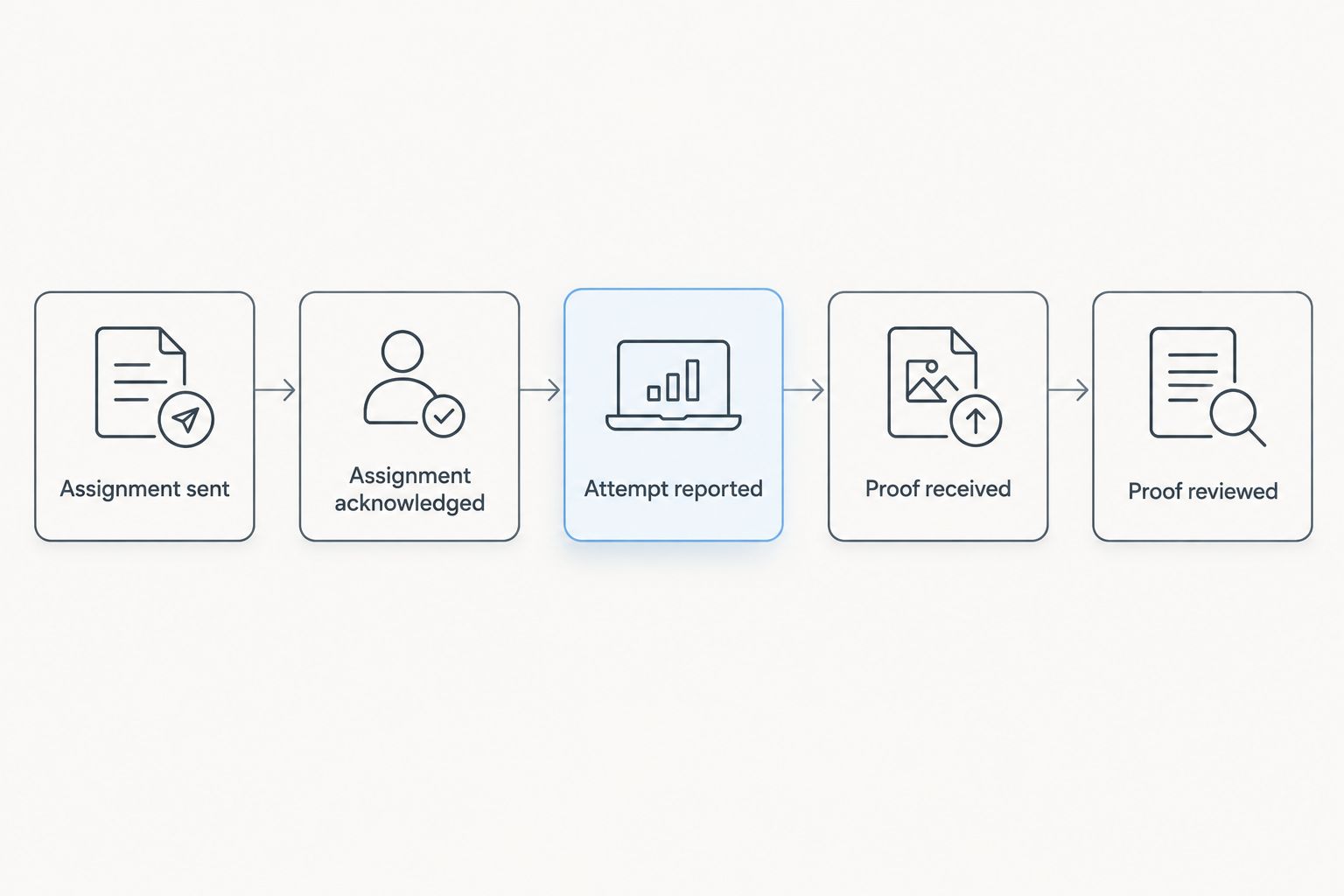
Use distinct internal status descriptions: assignment sent, assignment acknowledged, attempt reported, proof received and proof reviewed. Add a separate court-filing status when required.
An attempt update documents activity, not necessarily completed service. A proof received status means your office has the document, not that anyone has checked it. Precise descriptions prevent staff from closing a matter prematurely.
Proof review and filing configuration
Review the returned proof
- Match the proof to the correct case and recipient. Compare the document descriptions with the packet sent for service.
- Check that the service details and required signature are present on the applicable form or declaration. Review names, dates, address information and the stated service method for inconsistencies.
- Send discrepancies to the process server and case owner for clarification. Do not change the server's factual statements yourself.
- Save the reviewed proof with the assignment record. Preserve any corrected version and identify which version is final.
Expected result: You have a reviewed proof tied to the correct assignment and document packet. Unresolved discrepancies remain visible instead of disappearing into the filing queue.
Your 2026 completion checklist should keep factual review separate from legal sufficiency. Legal questions about service belong with your attorney or the applicable court guidance, not an administrative status label.
File when required and confirm the outcome
- Determine whether and how the proof must be filed under the applicable court instructions. Do not assume every returned document uses the same submission route.
- If the court's supported workflow uses File & ServeXpress, submit the reviewed proof through that workflow with the appropriate case and document information.
- Save the resulting response. Check whether it confirms receipt, acceptance or a rejection requiring action.
- Close the filing task only after the required outcome is documented. Keep a rejection open until corrected or otherwise resolved under the applicable instructions.
Expected result: The case record links the service assignment, final proof and any required filing acknowledgment. A reviewer can follow the sequence without reconstructing it from disconnected emails.
When a document packet changes
Use a second workflow whenever an authorized replacement packet arrives after the initial handoff. A file update is not a service instruction. Tell the process server exactly which packet the assignment should use.
- Determine whether the existing assignment is pending, underway or reported complete.
- Ask the case owner whether to pause, replace the packet or create a separate assignment. Do not make that legal or operational decision from the filename alone.
- Send the authorized replacement with a clear version reference and request acknowledgment of the change.
- Preserve the original packet and its activity history. Review the returned proof against the version actually served.
Expected result: The revised instructions are explicit, and the audit trail distinguishes the original packet from its replacement. Completed service is not silently relabeled as service of different documents.
Troubleshooting
- Electronic delivery is being treated as physical service. Recheck the required method. Keep the electronic transaction record, but arrange the physical assignment when instructed; do not mark that assignment complete from the platform receipt.
- The process server received the wrong packet. Identify the transmitted version, notify the case owner and send explicit replacement instructions. Obtain acknowledgment before treating the change as implemented.
- The recipient's address is unusable. Confirm the supplied information and report the problem to the assignment owner. Discuss whether an authorized skip-tracing assignment is appropriate instead of repeatedly resending the same address.
- The proof disagrees with your case record. Compare the recipient, documents and service details. Ask the server to resolve factual discrepancies before filing; retain the corrected document and version history.
- The court rejects the proof submission. Read the rejection reason, correct the identified submission issue and retain both transaction references. Escalate questions about the proof's legal adequacy to counsel.
Customize your workflow
Make your 2026 workflow specific to the matter without changing its core checkpoints. An eviction assignment, family-law packet and probate matter need their own instructions; the tracking method still separates documents, delivery evidence and court filing.
Golden Hill Legal Runner LLC provides process serving for civil, family, eviction, probate and small claims matters across San Diego County. Best for local physical-service assignments; not a replacement for your filing platform or legal review. Keep that division of responsibility visible in your checklist.
For office-wide coordination, the Clio-to-process-server workflow for law firms covers an adjacent case-management handoff. Use your case-management record as the index connecting each assignment to its documents and returned records.
Arrange San Diego process serving
Discuss the document packet, recipient details and timing for your physical-service assignment.
FAQ
How do I handle file and servexpress proof of service?
Track the electronic transaction, any required physical-service assignment and the completed proof separately. Review the proof against the actual document packet, then file it through the applicable court workflow when required.
Does File & ServeXpress electronic delivery replace a process server?
Not when the document requires physical service. Confirm the required service method for the document, recipient and case before treating an electronic delivery record as sufficient.
Does this workflow automatically connect File & ServeXpress to a process server?
No. This guide uses a documented handoff between your filing activity and a separate process-serving assignment; it does not describe an automatic integration.
What should I send with a physical-service assignment?
Send the final document packet, recipient details, instructed service method, applicable deadline and an authorized contact. Ask for acknowledgment of the packet and instructions so the assignment has a clear starting record.
Can I change a proof of service before filing it?
Do not alter the process server's factual statements yourself. Return discrepancies to the server for clarification or correction and direct legal questions to your attorney.
Is a submitted proof the same as an accepted proof?
No. A submission records transmission; check the court's returned acknowledgment to determine whether the filing was accepted or rejected.
Who handles physical process serving in San Diego County?
Golden Hill Legal Runner LLC offers physical process serving across San Diego County. The company is registered, bonded and insured and offers standard, rush, same-day and skip-tracing services.
One last thing
Keep the packet version beside the proof, not just beside the filing receipt. That small filing habit lets you check which documents the returned proof describes without reopening every message in the assignment thread.
For 2026, make that pairing part of your closeout check. Keep the required court acknowledgment alongside it when the proof must be filed.
Not a law firm. No legal advice provided.