Filevine to proof of service: complete 2026 workflow
Instead of manually chasing service updates across email and case notes, build a Filevine to proof of service workflow that connects an approved document packet, an acknowledged service request, and a reviewed return. This 2026 guide uses a staff-controlled handoff, with separate checkpoints for document delivery, proof review, and filing confirmation.
- Build your Filevine to proof of service workflow around recipient-specific requests, document versions, and reviewed returns.
- Golden Hill Legal Runner LLC handles San Diego County process serving; keep Filevine tracking and filing responsibilities assigned internally.
- Treat service completion, signed proof of service, and court filing confirmation as separate milestones.
- Start with a controlled manual handoff before adding automation to an approved process.
Why this matters
A service request is not complete because someone emailed the packet. Your file needs a traceable connection between the documents authorized for delivery, the recipient, the server's report, and the proof returned afterward.
Golden Hill Legal Runner LLC is best for firms needing process serving across San Diego County. The company offers standard, rush, same-day, and skip-tracing legal document delivery. This workflow assigns your firm responsibility for Filevine records and legal review; it does not assume a native connection between Filevine and the process server.
Build your 2026 procedure around distinct completion events. For the document side, review what counts as proof of service in California before deciding what evidence closes the service task.
Before you start
- Access and ownership: Have access to the correct Filevine project and its documents, permission to maintain the tracking record, and a named staff member responsible for the request through proof review.
- Approved materials: Assemble the authorized packet, recipient details, service address, court and case information, counsel-confirmed deadlines, and an approved method for transferring confidential documents.
- The setup trap: Document access does not equal delivery authorization. Freeze the approved packet before sending it, and confirm who will file the proof. A later document revision must not silently change an active assignment.
Use the status and field names below as proposed internal labels, not as a claim that Filevine includes a built-in process-serving template. Your administrator should place them in the firm's approved project configuration or tracking record.
Request record configuration
Establish the recipient and responsibility
- Open the correct Filevine project. Match the court case number and party names against the approved documents rather than relying on a similar project name.
- Create 1 service request per recipient as your operating rule. Give each request a stable internal identifier and link it to the project.
- Record the recipient's full name and capacity, the service address, and any alternate address separately. Identify the source of each address so staff can distinguish a confirmed address from an unverified lead.
- Assign Request owner and Backup owner in your tracking record. The request owner handles acknowledgments, exceptions, and the returned proof; the backup prevents an absence from leaving the assignment unattended.
- Record Service deadline and Deadline source only after the responsible legal professional confirms them. Keep the requested completion date separate from any hearing date or filing deadline.
Expected result: Another staff member can identify who must be served, which matter the request belongs to, and who owns the next action without opening an email thread.
Do not put confidential recipient details into broad notifications or task titles. Use the internal request identifier to connect records, and restrict sensitive information to the approved project location and transfer method.
Define the status sequence
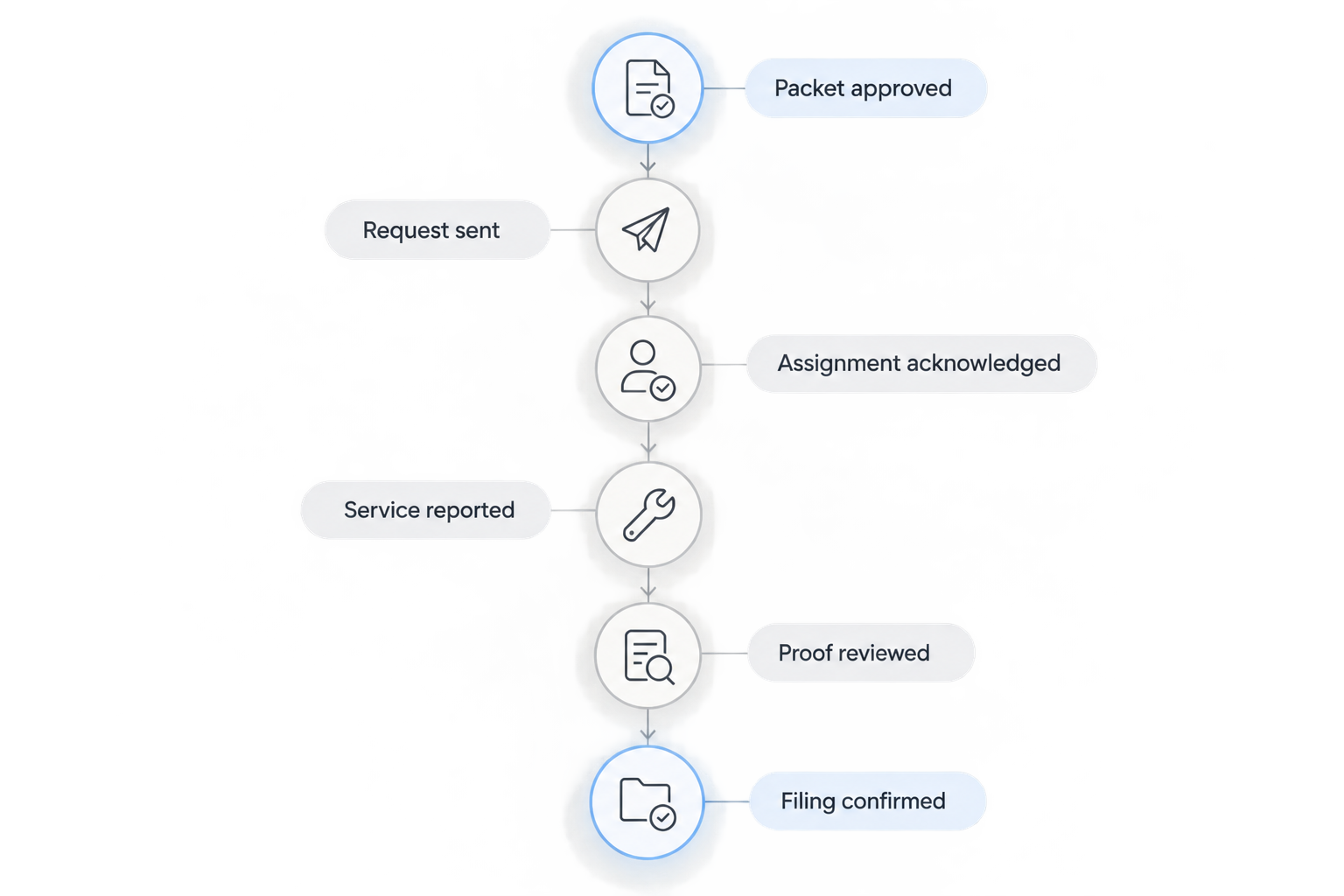
Use these proposed tracking states consistently. Each state records an observable event rather than an assumption.
| Proposed status | Evidence required | Next responsibility |
|---|---|---|
| Packet approved | Responsible reviewer authorizes the identified packet | Request owner prepares the handoff |
| Request sent | Transmission record identifies the recipient and packet | Request owner seeks acknowledgment |
| Assignment acknowledged | Server confirms receipt and assignment details | Request owner monitors exceptions |
| Service reported | Server reports the service outcome | Request owner obtains the return |
| Proof reviewed | Designated reviewer checks the signed proof | Assigned filer handles filing if required |
| Filing confirmed | Applicable court filing confirmation is retained | Request owner closes the filing task |
For your 2026 template, keep unsuccessful attempts outside the completed-service state. Record an attempt as an event, including the server's reported outcome and the action awaiting approval.
Document packet and dispatch configuration
Freeze the approved packet
- Open Docs in the correct Filevine project and identify the documents authorized for service. Check the actual files, not just their names.
- Create a packet manifest listing each document title and its revision or approval date. Include attachments and exhibits so reviewers can compare the manifest with the outgoing files.
- Apply a consistent filename pattern, such as case reference, recipient, document description, and version. Keep unnecessary personal information out of filenames.
- Confirm that every intended page is readable and correctly oriented. Check for missing attachments, blank scans, password restrictions, and unrelated material.
- Record Packet approved by and Packet approved date in the tracking record. Retain the exact approved outgoing copy rather than relying on a document that staff continue editing.
Expected result: Your Filevine record identifies the precise packet authorized for delivery. Staff can distinguish that copy from drafts and later revisions.
Set 2 review checkpoints in this procedure: one before dispatch and one after the proof returns. These are recommended controls, not legal deadlines or a substitute for counsel's review.
Send the assignment and capture acknowledgment
- Prepare a cover instruction containing the request identifier, court case number, recipient, address, packet manifest, requested timing, and return contact.
- State any counsel-approved service instructions clearly. Separate confirmed facts from leads, and include relevant access or safety information without directing unlawful entry or confrontation.
- Transfer the packet through the method agreed with the server and approved by your firm. Confirm the transfer method before sending confidential material.
- Record the transmission event and set Request sent. Preserve enough information to establish which packet went out and when.
- Obtain acknowledgment of the assignment, recipient, address, packet, and requested timing. Resolve discrepancies before treating the request as accepted.
- Set Assignment acknowledged only after that confirmation. Assign the next follow-up action to the request owner.
Expected result: Your firm has evidence of both transmission and acknowledgment. An outgoing message alone does not establish that the assignment has been accepted.
When assigning San Diego County process serving to Golden Hill Legal Runner LLC, confirm the requested service level and return instructions for that assignment. An urgent request does not establish that delivery will succeed by a particular deadline.
Return and proof review configuration
Record attempts without closing the request
- Add each reported attempt to the recipient-specific tracking record. Preserve the reported date, time, location, outcome, and source.
- Distinguish a server's direct observation from information supplied by another person. Do not rewrite an uncertain report as a confirmed fact.
- Route address problems, identification questions, or requests for changed instructions to the responsible reviewer. Keep the assignment open while that decision is pending.
- Record any approved change and obtain acknowledgment before treating the revised instructions as active.
Expected result: Anyone reviewing the matter can separate attempted service, a request for further instructions, and reported completed service.
Do not convert an unsuccessful attempt into a new service method through an administrative status change. The responsible legal professional must determine the appropriate next step for the case.
Review the signed proof and filing record
- Save the returned signed proof in the correct project's Docs area. Connect it to the request identifier and retain the server's accompanying report.
- Compare the proof with the approved packet manifest and assignment. Check the case number, recipient, document descriptions, reported date and location, service method, and completion of applicable signature fields.
- Send discrepancies to the server for clarification or correction. Do not edit the server's declaration yourself. Preserve the earlier version and the correction history.
- Set Proof reviewed only after the designated reviewer accepts the return for the firm's next step. Keep unresolved issues assigned to a named owner.
- If filing is required, route the reviewed proof to the assigned filer. Store the applicable court confirmation separately from the signed proof and submission receipt.
- Set Filing confirmed only when the required confirmation is available. If filing is rejected, reopen the filing task and preserve the rejection notice.
Expected result: The project distinguishes the server's reported completion, the reviewed signed proof, and the court filing outcome. No single completion checkbox stands in for all of them.
Your 2026 closeout record should make those distinctions visible without requiring staff to reconstruct the matter from attachments.
Update the assignment when information changes
A revised address or corrected document packet creates a second workflow: change control. Keep the existing request identifier when it remains the same assignment, but preserve each revision and the instructions it replaced.
- Record the proposed change and why it is needed. Identify whether the address, recipient information, packet, or timing changed.
- Obtain approval from the responsible reviewer. If the old packet must not be used, communicate that instruction directly and request acknowledgment.
- Send a clearly identified revision containing only the approved current instructions and documents. State what the revision replaces.
- Ask whether any attempt or completed service occurred before acknowledgment of the change. Record the answer before reconciling the matter.
- Update the active tracking record without deleting the historical packet or transmission evidence.
Expected result: The project shows what changed, who authorized it, and whether the server received the revision before acting.
Test your 2026 procedure with 3 test scenarios before using it on live assignments: a normal return, a revised packet, and an unsuccessful address. Use fictional records without client information, then check whether a backup staff member can identify the next action in each scenario.
Troubleshooting
The packet was sent twice
Compare request identifiers, recipients, and manifests before canceling anything. Contact the server to determine whether duplicate assignments exist, then document which assignment remains active. Add a pre-dispatch check for an existing open request for the same recipient and packet.
The server received an outdated packet
Identify the exact version sent and obtain the server's report of any action already taken. Send corrected instructions through the approved change process. Refer any question about the effect of earlier service to the responsible legal professional.
Service is reported, but no signed proof is attached
Keep the request at Service reported and assign follow-up for the signed return. A message saying service occurred is not the same workflow artifact as a completed, signed proof ready for review.
The returned proof contains a mismatch
Compare the proof against the outgoing packet and assignment record. Request clarification or a corrected return from the server, retain both versions, and keep the review task open until the designated reviewer resolves the discrepancy.
The court rejects the filing
Preserve the rejection notice and assign correction to the responsible filer or reviewer. Distinguish a document problem from a submission problem. Do not mark service unsuccessful solely because the filing submission was rejected.
Customize your workflow
Best for initial rollout: use a staff-controlled handoff. Its advantage is visible human review of the packet and return; its limitation is that staff must maintain acknowledgments and status updates consistently.
Add automation only after your administrator verifies the available Filevine capabilities, permissions, and approved connection method. Start with internal reminders and exception routing rather than automatic external dispatch. A wrongly mapped recipient or stale document remains wrong when software sends it faster.
For Golden Hill Legal Runner LLC process serving assignments, keep the operational handoff separate from legal decisions about service method, deadlines, and filing. The company is registered, bonded, and insured; those credentials do not replace your firm's review of the assignment or returned proof.
Before expanding the workflow, document who handles an unavailable request owner, a changed packet, an unresolved address, and a rejected filing. A procedure that works only when its creator is present is not ready for wider use.
FAQ
How do I build a Filevine to proof of service workflow?
Create a recipient-specific request, freeze the approved packet, capture the server's acknowledgment, and review the signed proof when it returns. Track any required filing confirmation separately from service completion.
Does this workflow require a native Filevine integration?
No. This guide uses a staff-controlled handoff between Filevine records and the process server. Verify supported capabilities and permissions before adding an automated connection.
Can I automatically send every newly uploaded document for service?
Do not use document upload alone as dispatch authorization. Require approval of the specific packet and recipient so drafts, unrelated documents, and revised files do not create unintended assignments.
What should I do when the service address changes?
Record the change, obtain approval, and send revised instructions with a request for acknowledgment. Confirm whether the server acted on the earlier address before updating the active assignment.
Is a service completion email the same as proof of service?
Treat a completion email and a signed proof of service as separate records. Obtain the appropriate signed return and have the designated reviewer check it before moving to filing or closeout.
Who should file the proof of service?
Assign filing responsibility expressly before dispatch. Do not assume the process server files the proof simply because the server performs delivery; confirm the arrangement and retain the applicable filing confirmation.
Can Golden Hill Legal Runner LLC handle San Diego County assignments?
Yes. Golden Hill Legal Runner LLC offers process serving across San Diego County, including standard, rush, same-day, and skip-tracing legal document delivery. Confirm instructions and requested timing for the individual assignment.
One last thing
Make the next action more visible than the latest status. A record marked Service reported still needs an owner and a task if the signed proof has not arrived. Before closing any request, ask a backup staff member to identify the outstanding action without reading the full message history.
Not a law firm. No legal advice provided.
Related guides
- Submitting proof of service through California's eFileCA system
- Skip tracing to service of process: complete workflow
- How soon can proof of service be filed?
Ready to get papers served? Book online with a registered process server in San Diego.