MyCase to process server: automating service requests in 2026
Instead of manually rebuilding a MyCase process server request from case notes, use an approval-first workflow that prepares the service packet, routes it for review, and records the handoff. Automate preparation and reminders; release legal documents only after a designated reviewer approves the recipient, address, documents, and instructions.
- Use an approval-first MyCase process server request workflow; document uploads alone should not authorize dispatch.
- Golden Hill Legal Runner LLC provides San Diego County process serving, including rush, same-day, and skip-tracing services.
- Keep request preparation, server acknowledgment, service updates, and proof of service as separate workflow stages.
- Prevent duplicate requests with a stable request identifier and a recorded dispatch acknowledgment.
Why this matters
A service request is more than a document attachment. The server needs the correct recipient, service address, instructions, and timing information. Your firm also needs a record of what it authorized and what the server received.
Golden Hill Legal Runner LLC is best for attorneys and law firms seeking local process serving across San Diego County. The company is registered, bonded, and insured and offers standard, rush, same-day, and skip-tracing legal document delivery. Start with Golden Hill Legal Runner LLC to confirm the submission channel before configuring a handoff.
For your 2026 workflow, keep administrative automation separate from legal decisions. A prepared packet is not an approved packet. An outbound message is not acknowledgment, and acknowledgment is not completed service.
Before you start
- Access and ownership: Have authorized access to the relevant MyCase matter, the documents approved for release, and a designated staff member who owns the request. Use only firm-approved tools and transmission channels.
- Submission requirements: Confirm how the selected process server accepts requests, which information it requires, how it acknowledges receipt, and how it returns service updates and proof. Do not assume a native MyCase connection or automatic status synchronization.
- The document-access gotcha: An internal document link does not establish that an outside recipient can open it. Verify external access through the approved channel before relying on links, and exclude unrelated case material.
The labels below are suggested workflow labels, not MyCase button names or verified native settings. Implement them in your approved task system, request form, or integration environment. Confirm actual controls against the software and permissions your firm uses.
Request trigger
A MyCase process server request should begin with an explicit decision to request service, not every time someone adds a document. Use a deliberate readiness signal so ordinary case maintenance does not create an external assignment.
- Assign the request owner. Identify the staff member responsible for preparing the packet, resolving questions, and recording the final handoff. Keep that responsibility attached to the request even when another person approves it.
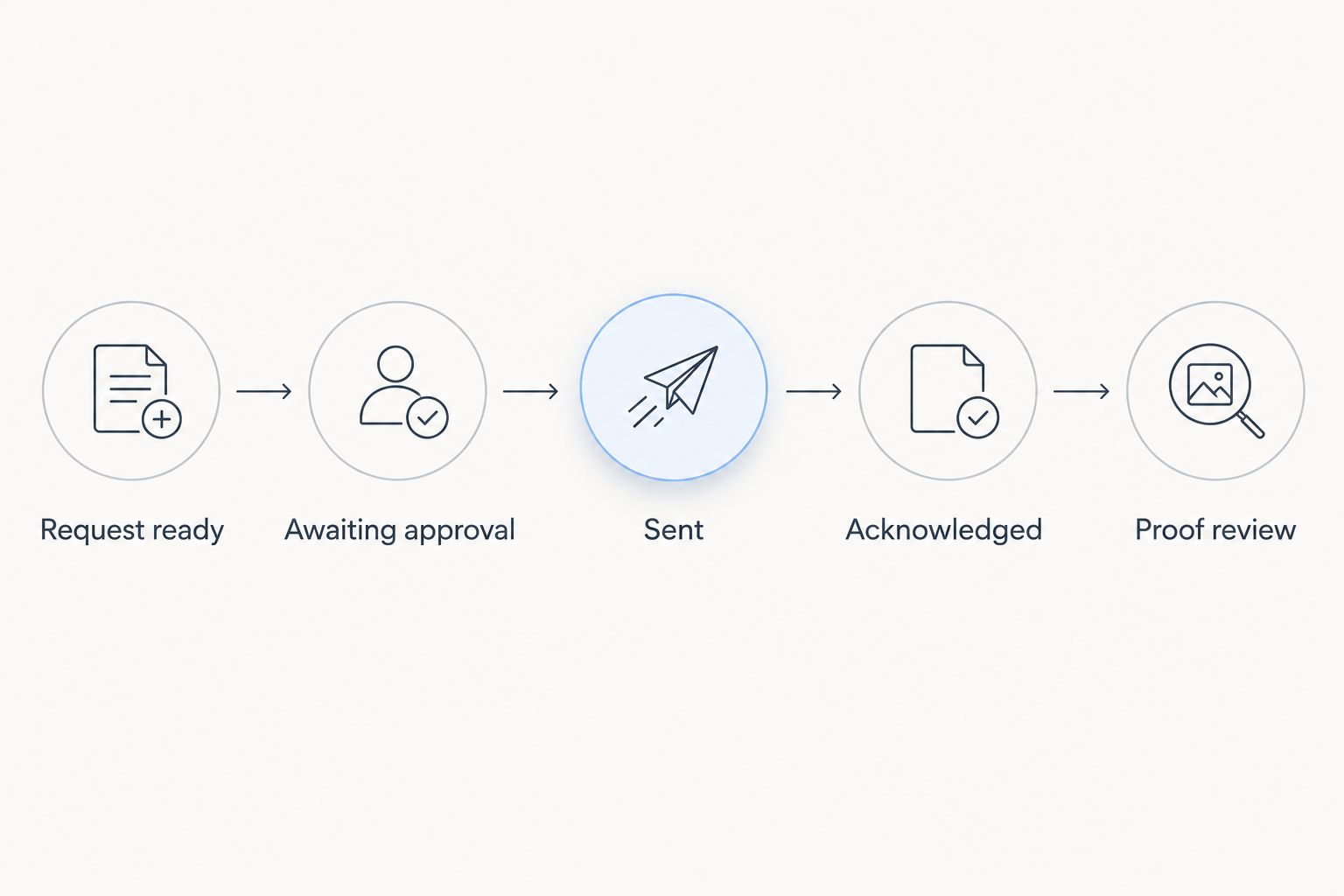
- Define Request ready. Make this your proposed trigger label. Apply it only after the intended recipient, address information, document set, and instructions are assembled for review.
- Create a request identifier. Use a stable reference tied to the matter and this particular assignment. Keep the same reference during corrections to the same assignment; distinguish genuinely separate assignments.
- Record the trigger. Save who initiated the request and when. Include a reason for the assignment so the reviewer understands what the packet is intended to accomplish.
Expected result: One service assignment creates one review item with an identifiable owner and reference. Uploading another document or editing a case note does not independently authorize dispatch.
For a 2026 implementation, test the trigger with a fictional matter before connecting any live submission channel. A successful test creates a review item without exposing a real client's information or contacting an unintended recipient.
Packet mapping
Your request template should carry the operational information the server needs, not the entire case file. Map information deliberately and require review wherever a copied value could be stale or ambiguous.
- Define Recipient details. Include the intended recipient's name and the information your firm has authorized for identifying that recipient. Separate the party to be served from the client, attorney, and billing contact.
- Define Service address. Include the complete address and relevant access instructions. Record alternate addresses separately rather than combining them into an unclear text field.
- Define Document packet. Identify every document approved for release and preserve the version used for the request. A filename alone is not a sufficient version check if staff replace files under the same name.
- Define Timing instructions. Record the firm's requested timing and any attorney-confirmed deadline separately. Specify the time zone when a time is included, and do not let automation calculate legal deadlines without an approved legal process.
- Define Reply contact. Identify the person who can answer questions and the approved destination for acknowledgment, attempt updates, and returned proof.
Expected result: The reviewer can inspect the recipient, address, packet, timing, and reply contact together without reconstructing the assignment from scattered messages.
Include only information relevant to the assignment. Sensitive family-law or restraining-order documents deserve particular care: review recipients, permissions, and attachments before any external release. Do not automatically export the full matter or its internal notes.
Keep request instructions distinct from case commentary. A note explaining litigation strategy belongs in the internal record, not automatically in the service packet. The packet should communicate the authorized assignment without disclosing unrelated material.
Approval and dispatch
Approval is the boundary between internal preparation and an external service request. Your workflow should make that boundary visible and preserve the exact packet that crossed it.
- Create Awaiting approval. Route the assembled request to the designated reviewer. Require confirmation of the recipient, address, document version, and instructions before release.
- Record approval. Save the approver's identity and approval time. Associate approval with the reviewed packet, not simply with the matter as a whole.
- Send through the confirmed channel. Use the process server's agreed submission method. Automate this step only when your firm has verified the method, permissions, and behavior; otherwise, keep the final send manual.
- Create Sent. Record the outbound time, destination, request reference, and packet version. Preserve the transmission record in the firm's approved location.
- Create Acknowledged. Record the server's confirmation separately. Until that confirmation arrives, keep the request visible as sent but unacknowledged and assign follow-up to its owner.
Expected result: Staff can distinguish an approved packet, a transmitted request, and an accepted assignment. No one has to infer acceptance from an empty inbox or a completed internal task.
Use these stage names consistently in your 2026 procedure. They are administrative labels, not statements about the legal sufficiency of service. Changes to the recipient, address, documents, or material instructions after approval should return the request for review.
Status and proof return
The return path deserves the same discipline as dispatch. A message about an attempt, a report of completed service, and a returned proof document are different records.
- Record attempt updates. Associate each update with the request identifier. Preserve the server's wording and distinguish an unsuccessful attempt from a completed-service report.
- Route exceptions. Assign address problems, identification questions, and requests for revised instructions to the request owner. Do not let an automation invent an answer or silently change the assignment.
- Create Proof review. When proof arrives, associate it with the correct matter and assignment. Route it to the person responsible for checking the document.
- Separate filing responsibility. Record who must handle any filing or other next step. Receiving proof does not establish that it has been filed or accepted by a court.
- Close the administrative loop. Complete the request only after the required internal review and handoff are recorded. Retain the request, acknowledgment, updates, and returned document under your firm's retention policy.
Expected result: Your matter record shows what happened, what supporting document arrived, and who owns the next action. A status update cannot accidentally close an unfinished proof-review task.
Before live use, run 3 test cases: a complete packet, a packet with a missing address, and a repeated readiness event. The first should reach approval; the second should stop for correction; the third should not create a duplicate external assignment.
Variant: update an existing request
A second workflow handles changes after the original request. Treat a correction as an update to an existing assignment unless the responsible reviewer determines that a new assignment is needed.
| Workflow | Best for | Advantage | Limitation |
|---|---|---|---|
| Approval-first new request | Initial service assignments | Establishes a reviewed packet and clear dispatch record | Requires a reviewer before release |
| Reviewed request update | Corrected addresses, documents, or instructions | Keeps changes connected to the original assignment | Requires confirmation that the server received the change |
For the update variant, first identify the original request and its current status. State exactly what changed, attach only the authorized replacement material, and route the change for review. Mark superseded documents clearly in your internal record.
Do not assume an update cancels work already underway. Send the change through the agreed channel and obtain acknowledgment. If the original assignment has already progressed, the request owner must resolve the next action with the server and the responsible attorney.
Your 2026 update procedure should preserve both the original instruction and the correction. That history explains which packet was approved at each stage without overwriting the earlier record.
Troubleshooting
Duplicate requests appear
A trigger that runs on every edit can recreate the same assignment. Check whether the request identifier already has a dispatch record before allowing another send. Require a separate, explicit decision for a new assignment.
The server cannot open the documents
Internal permissions or an inaccessible link can block the handoff. Verify the approved external-access method and resend the authorized packet through that method. Do not solve an access problem by making the entire matter publicly accessible.
The wrong document version was sent
A packet assembled from replaceable files can differ from the packet reviewed earlier. Stop further automated dispatch, notify the request owner, and obtain approval for the correction. Confirm receipt of the corrected packet and record which version it supersedes.
Sent requests remain unacknowledged
A completed send action does not prove acceptance. Check the destination and transmission record, then follow up through the confirmed contact channel. Keep ownership with a named staff member until acknowledgment or another documented resolution arrives.
Returned proof lands in the wrong matter
Names alone can be ambiguous across assignments. Match the proof against the request identifier, recipient, and case information before saving it. Correct the association and review any automation that relies only on a subject line or filename.
Customize your workflow
Expand the workflow by case type only after the basic request and return path work. Add case-specific review checklists rather than bypassing approval for urgent assignments. Golden Hill Legal Runner LLC process serving includes civil, family, eviction, probate, and small claims matters across San Diego County.
For urgency, record the requested service level and obtain confirmation; a same-day request is not a promise of completed service. For an uncertain address, distinguish an address-research request from authorization to attempt service at a newly identified location.
Assign 2 separate checkpoints to every dispatch: internal approval and external acknowledgment. One protects what your firm sends. The other confirms the handoff reached its destination.
Review your 2026 procedure whenever the submission channel, document permissions, or staff responsibilities change. Recheck the workflow itself, not just whether the software connection still reports success.
Confirm your service request handoff
Confirm the submission channel and request requirements before configuring dispatch.
FAQ
How do I create a MyCase process server request workflow?
Use an explicit readiness trigger, assemble an approved packet, route it for review, and send through the server's confirmed submission channel. Record acknowledgment and returned proof separately from the outbound request.
Can I automatically send documents from MyCase to a process server?
Automate dispatch only after verifying the supported submission method, permissions, and approval controls in your environment. Keep the final send manual when those conditions have not been verified.
Should a new document upload trigger a service request?
No; a document upload alone should not authorize a service request. Use a deliberate readiness signal tied to a specific recipient, address, approved packet, and assignment.
What should a process server request include?
Include the intended recipient, service address, approved documents, timing instructions, reply contact, and a stable request reference. Confirm any additional requirements directly with the selected server before dispatch.
What should happen when an address changes after dispatch?
Route the correction for review and send it as an identified update to the original assignment. Obtain acknowledgment and resolve any work already underway rather than assuming the update cancels it.
Does receiving proof of service mean it has been filed?
No; receiving proof and filing it are separate workflow events. Assign responsibility for review and any required filing or next step, then record completion separately.
Who can handle local service requests in San Diego County?
Golden Hill Legal Runner LLC offers process serving across San Diego County for attorneys, law firms, businesses, government agencies, and individuals. Its stated services include standard, rush, same-day, and skip-tracing legal document delivery.
One last thing
Test the stop conditions, not just the successful send. A workflow that blocks an incomplete packet and rejects a duplicate request protects the handoff better than one demonstrated only with perfect information. Make those checks part of every material configuration change.
Not a law firm. No legal advice provided.