Smokeball to process server: complete 2026 workflow
Instead of copying case details into scattered emails, build a Smokeball process server workflow that moves an approved document packet from the matter to the server, then returns updates and proof of service to the same file. This 2026 guide uses a staff-reviewed handoff, with separate checkpoints for dispatch, service confirmation, and filing.
- Use a reviewed Smokeball process server workflow; document changes should not automatically authorize dispatch.
- Golden Hill Legal Runner LLC provides process serving across San Diego County for law firms and other clients.
- Assign one request owner and keep attempt updates, proof of service, and filing confirmation distinct.
- Close the assignment only after the required records return to the correct matter.
Why this matters
A sent document packet is not an accepted assignment. A successful service update is not a filed proof of service. Your workflow needs to preserve those distinctions instead of treating every outgoing message as completed work.
Golden Hill Legal Runner LLC is best for this workflow when your law firm needs process serving within San Diego County. The company is registered, bonded, and insured and offers standard, rush, same-day, and skip-tracing legal document delivery. Start with Golden Hill Legal Runner LLC to discuss the assignment and confirm the handoff method before sending sensitive documents.
The instructions below describe an operating procedure, not a native software connection. Keep Smokeball as the matter record and use an agreed delivery channel for the service request. Staff review remains the release point.
Before you start
- Access and authority: Have access to the correct Smokeball matter, the approved documents, and your firm's permitted external-sharing method. Identify the staff member authorized to release the packet and the attorney responsible for legal instructions.
- Assignment materials: Prepare the recipient's identity, service address, case reference, document list, relevant dates, and a return contact. Confirm the server's intake requirements before assembling the final packet.
- The gotcha: Updating a document after sending it does not replace the server's copy. Establish a replacement-and-acknowledgment procedure before dispatch so a revision cannot silently become a second assignment.
For your 2026 procedure, give each request a unique reference and an owner. The bold task names below are suggested labels you create internally, not Smokeball menu names; use the controls available in your account to record the same information.
Matter record and release checklist
- Verify the matter. Open the intended matter and compare the case number, party names, and court against the documents. Resolve mismatches before preparing the service request. Do not use a familiar client name as the only identity check.
- Create the request reference. Use a reference that identifies the matter, recipient, and packet revision without exposing unnecessary personal information in message subjects. Keep the reference unchanged when discussing the same assignment.
- Assign the release owner. Create an internal task named Review service packet and assign responsibility. Record who approves the documents and who sends them. These roles can belong to the same person, but ownership must be explicit.
- Record dates separately. Distinguish the hearing date, any attorney-confirmed service deadline, and the requested dispatch date. Include the year and time zone when a time matters. Do not ask an administrative workflow to calculate a legal deadline from an unreviewed date.
- Check the recipient. Confirm the name and address against the approved instructions. Separate verified details from leads, such as an address that still needs investigation. Include safety or access information only through the permitted channel.
Expected result: The matter contains an identifiable request, a responsible owner, and approved instructions. Nothing has been released merely because documents were saved.
Use 1 request per recipient as your default administrative rule. When an assignment involves multiple recipients, confirm how the server wants them grouped, then preserve a separate status and proof record for each person or entity.
Document packet and dispatch instructions
- Assemble the approved packet. Collect the exact documents authorized for delivery. Check signatures, attachments, page order, legibility, and any court-issued pages. Do not include the entire matter file when the assignment requires only selected documents.
- Open the outgoing copies. Inspect the files you will actually transmit, not just the originals in the matter. Confirm that conversion or export has not omitted pages or made text unreadable. Remove superseded drafts from the outgoing selection.
- Write the instruction sheet. Identify the request reference, recipient, address, document list, requested service level, relevant dates, and return contact. Have the responsible attorney resolve questions about the required service method or supporting forms.
- Confirm the channel. Ask Golden Hill Legal Runner LLC which submission method to use and how acceptance will be communicated. Follow your firm's confidentiality rules. Do not assume a software connection, shared-folder permission, or email address establishes an accepted assignment.
- Release and preserve. Send the approved packet, then retain the outgoing message or submission record with the matter. Record the revision sent and the staff member who released it. Create Confirm assignment acceptance as the next internal task.
Expected result: The matter preserves an exact record of what left the firm, where it went, and which acknowledgment remains outstanding.
A useful instruction sheet separates 3 records: recipient details, delivery instructions, and return-document requirements. Keeping those records distinct helps staff update an address without accidentally changing the document list or the requested return paperwork.
Acceptance and attempt tracking
- Confirm receipt and acceptance. Obtain acknowledgment that identifies the assignment and packet. Clarify unresolved instructions before treating the request as active. A transmission receipt alone does not establish that the server accepted the work.
- Record the assignment reference. If the server supplies a reference, add it beside your internal request reference. Use both in follow-up messages so staff can match an update without searching by recipient name alone.
- Define the update route. Agree where attempt information and questions should go. Assign a backup contact for the request owner. Set an internal follow-up reminder that reflects the actual assignment rather than an assumed response schedule.
- Log reported events. Record attempt updates with the date, source, and reported outcome. Distinguish an unsuccessful attempt, an address problem, a request for instructions, and confirmed service. Preserve the original communication rather than rewriting it as an unsupported conclusion.
- Route decisions for approval. Send questions about changed documents, addresses, or service instructions to the responsible person. Record the authorization before asking the server to change the assignment.
Expected result: Anyone covering the matter can identify the last reported event, the next action, and the person responsible for it.
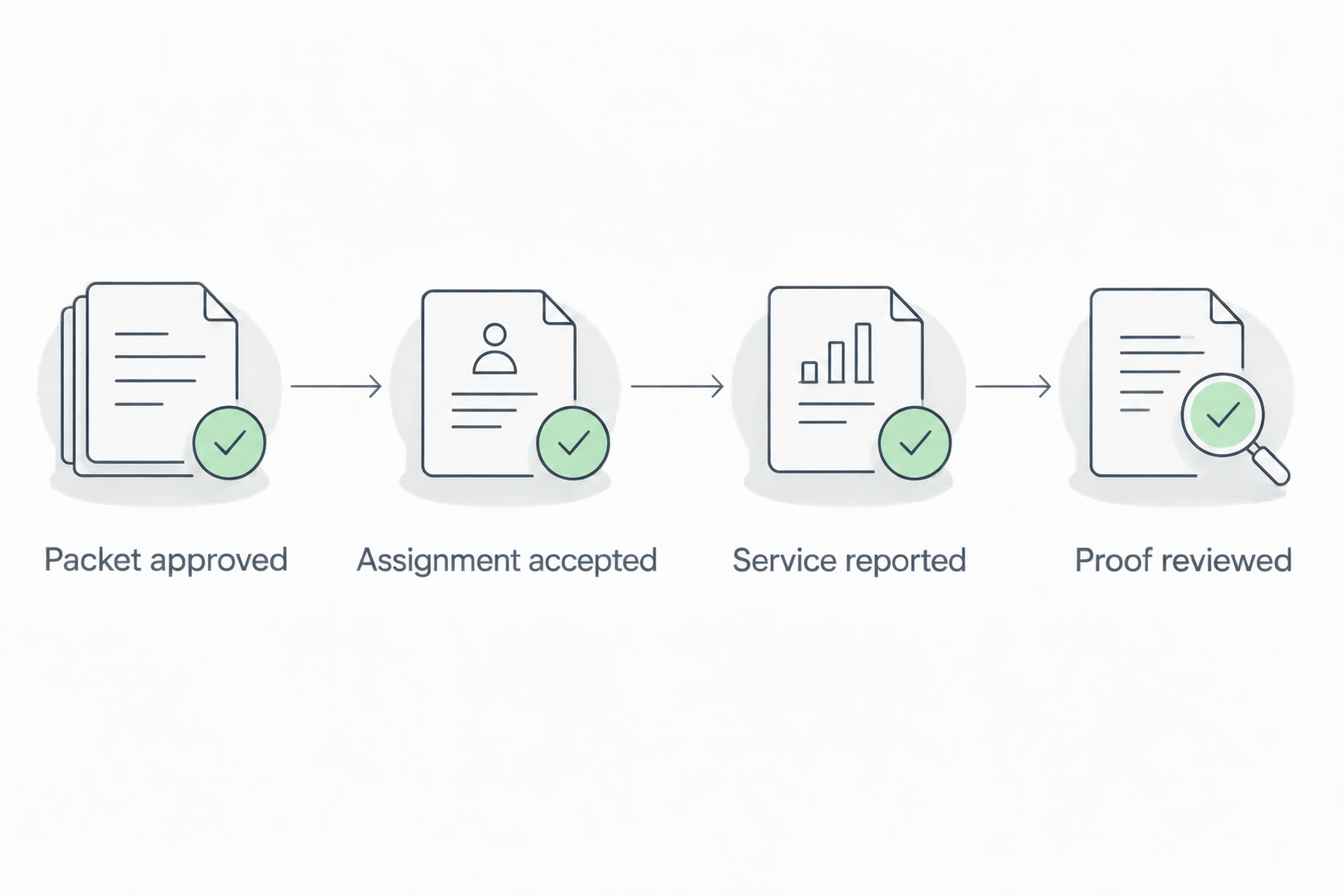
Keep these milestones separate in your 2026 task template: Packet approved, Assignment accepted, Service reported, and Proof reviewed. These are internal tracking labels, not conclusions about legal sufficiency.
Proof return and matter closeout
- Save the returned proof. Place the returned document in the correct matter and associate it with the recipient and request reference. Preserve the server's original file. Keep corrected versions distinguishable from earlier copies.
- Review for mismatches. Compare the proof against the assignment: case identification, recipient, documents, reported service details, and required execution information. Escalate omissions or inconsistencies to the responsible attorney or server instead of silently editing the signed document.
- Separate review from filing. Assign Review returned proof before Confirm proof filing. Identify who handles filing where required. Do not assume that returning a proof means the server also filed it.
- Retain the filing result. Where filing is required, save the relevant acceptance or rejection record. A submitted filing and an accepted filing are different events. Route rejections back to an owner instead of closing the task.
- Close with an audit trail. Confirm that the matter contains the released packet, assignment acknowledgment, reported outcome, reviewed proof, and any required filing confirmation. Leave unresolved work open with a named owner.
Expected result: The matter shows what was requested, what was reported, and which return documents were reviewed and filed.
Use 2 closeout checkpoints: proof review and filing confirmation, where filing is required. For document-specific context, see what counts as proof of service in California. The responsible attorney determines the requirements for the particular case.
Variant: revised documents or a changed address
A revised packet needs a controlled change request, not a duplicate dispatch. Keep the existing assignment reference when discussing the change, and identify exactly what replaces the earlier instructions.
- Pause the internal release task while the revision is reviewed.
- Identify whether the change concerns documents, recipient details, an address, or timing.
- Send an explicit replacement or supplemental instruction through the agreed channel.
- Ask the server to acknowledge the change and clarify the status of the earlier packet.
- Save both the change request and acknowledgment to the matter.
If work has already occurred, obtain the reported facts before deciding the next action. Never assume that replacing a file in Smokeball withdraws a packet already transmitted outside the system.
Choose the right handoff control
These are administrative workflow options, not software integrations. Both retain human approval before external dispatch.
| Workflow option | Best for | Advantage | Limitation |
|---|---|---|---|
| Reviewed manual handoff | Assignments needing individual instructions | Staff inspect the packet and instructions together | Staff must create and complete each follow-up |
| Reusable internal checklist | Repeated assignments with consistent review stages | The same checkpoints guide each request | A copied checklist still needs case-specific review |
Use a reusable checklist for consistency, not automatic dispatch. A changed file is a reason to review the assignment, not permission to send it.
Troubleshooting
The packet was sent, but acceptance is unclear
Keep the assignment pending. Verify the destination through the agreed contact route, request acknowledgment, and document the response. Do not create a duplicate request merely because an internal task remains overdue.
The server has an older document version
Identify both revisions and state which documents are being replaced. Ask whether any action occurred using the earlier packet, then obtain acknowledgment of the new instructions. Preserve the history in the matter.
An attempt update cannot be matched to a recipient
Compare the assignment reference, recipient, address, and date before changing the status. Ask for clarification when those details conflict. A shared surname or case number is not enough when several recipients belong to the same matter.
Service is reported, but no proof has returned
Record the reported service separately and leave the proof task open. Request the return document through the agreed channel. Do not mark Proof reviewed complete based on a brief status message.
The returned proof contains a mismatch
Keep the original, identify the discrepancy, and request review or correction from the appropriate person. Do not alter a server's signed statement yourself. Preserve the corrected document and correspondence together.
Customize your workflow
Build your 2026 checklist around exceptions: revised packets, uncertain addresses, multiple recipients, urgent instructions, and staff absences. Give each exception an owner and a release condition so an unresolved question cannot disappear inside a completed task.
Golden Hill Legal Runner LLC offers process serving and skip-tracing legal document delivery across San Diego County. Confirm the scope and instructions for the specific request; this guide does not promise a connector, a response interval, or a particular outcome.
Before adopting the checklist firm-wide, walk through a sample matter without sending documents. Check whether a covering colleague can identify the approved packet, current assignment status, next action, and filing owner without reading an entire email chain.
FAQ
What's the safest Smokeball process server workflow?
Use a reviewed handoff with separate checkpoints for packet approval, assignment acceptance, service reporting, and proof review. Keep the outgoing packet and returned records attached to the correct matter.
Does this workflow require a native Smokeball integration?
No. This workflow uses a staff-reviewed document handoff and matter-based tracking rather than relying on a native connection. Confirm any proposed connector separately before granting access or enabling dispatch.
Can I automatically send documents whenever a Smokeball file changes?
Keep document changes behind an approval checkpoint rather than using them as dispatch authorization. A saved change does not establish that the packet is complete, approved, or intended to replace an existing assignment.
What should I send with a process serving request?
Send the approved document packet and clear assignment instructions through the agreed channel. Include the recipient, address, request reference, relevant dates, return contact, and document list without sharing unrelated matter contents.
What should I do when the service address changes?
Send an explicit change request and obtain acknowledgment before treating the new address as active instructions. Preserve the original address, revised instructions, and response in the matter record.
Does a returned proof of service mean it has been filed?
No. Returning proof and filing proof are separate workflow events. Identify the filing owner and retain the filing result where filing is required.
Who provides process serving for this San Diego workflow?
Golden Hill Legal Runner LLC provides process serving across San Diego County for attorneys, law firms, businesses, government agencies, and individuals. Confirm the submission method and assignment instructions before releasing documents.
One last thing
Make replacement instructions harder to miss than the original request. A revised attachment without an explicit change message leaves the recipient to guess which packet controls. Add a required acknowledgment step to your 2026 procedure and keep the task open until the instruction is resolved.
Not a law firm. No legal advice provided.
Related guides
- Skip tracing to service of process workflow
- Submitting proof of service through California's eFileCA system
- How to hire a process server in San Diego County
Ready to get papers served? Book online with a registered process server in San Diego.