PracticePanther to proof of service: complete 2026 workflow
Instead of manually chasing documents, attempt updates, and returned proofs across separate messages, use a PracticePanther process server workflow that ties each service request to its matter, recipient, and final proof. Keep a human approval gate before dispatch and another before closing the assignment; this 2026 guide uses a controlled handoff, not an assumed native integration.
- Use a PracticePanther process server workflow with separate dispatch, service, proof review, and filing checkpoints.
- Golden Hill Legal Runner LLC serves San Diego County; keep assignment approval with your designated matter owner.
- Send approved documents, recipient details, deadlines, and return instructions together.
- A returned proof of service is not a court filing confirmation.
Why this matters
A document upload, an accepted assignment, a completed service, and a filed proof are different events. Do not use one completion status for all four. Your workflow needs to show which event happened and who owns the next action.
Golden Hill Legal Runner LLC is best for attorneys and legal teams seeking a registered, bonded, and insured process serving company for San Diego County assignments. Start with Golden Hill Legal Runner LLC when selecting the delivery provider, then keep the matter record as your internal reference.
The advantage of this approach is control: you approve what leaves the firm and review what returns. The trade-off is staff involvement. Someone must reconcile updates and documents rather than assuming a connector has synchronized them.
Before you start
- Access and ownership: Have authorized access to the relevant PracticePanther matter and its documents. Designate a request owner, a backup, and the person responsible for reviewing returned proof.
- Approved materials: Gather the approved service packet, recipient information, address, case number, court information, deadline instructions, and a secure handoff method accepted by the provider. Confirm the current submission procedure before sending confidential materials.
- The hidden gotcha: One matter can contain multiple recipients and document versions. Use 1 request per recipient as your operating rule, and keep a replacement packet distinguishable from the original. A changed attachment must not silently become a second assignment.
For your 2026 setup, the labels below are suggested checklist labels—not claimed PracticePanther menu names or built-in automation settings. Apply them through the task, note, or tracking method your team already uses. Verify actual interface controls in your account before configuring software automation.
Matter record and packet approval
Prepare the dispatch record
- Open the correct matter in PracticePanther. Match the case number, parties, and intended recipient against the documents rather than relying on a similar matter name.
- Create a service-request entry using your existing tracking method. Record the internal matter identifier, recipient, service address, request owner, and provider assignment reference once received.
- Identify the approved packet. Record its document names and revision date, and distinguish documents intended for service from correspondence or internal work product.
- Add separate deadline entries for the service instruction, any hearing information relevant to the request, and the team's follow-up. Have the responsible attorney or authorized reviewer confirm legal deadlines and service instructions.
- Add an approval checkpoint labeled Packet approved. Record who approved dispatch and when. Do not treat document preparation as authorization to send.
Expected result: Another authorized team member can identify the recipient, approved packet, instructions, and responsible owner without reconstructing an email chain.
Keep the dispatch record brief but complete. The server needs actionable information, not every document in the matter. Exclude unrelated sensitive material and distinguish verified address information from leads that still need checking.
For 2026 matters involving a hearing change or amended document, revisit approval before dispatch. A correct packet attached to an outdated instruction creates an avoidable handoff problem.
Service request and acceptance
Send a complete assignment
- Confirm the provider's current intake method and secure transmission requirements. Use that accepted channel; do not assume a PracticePanther connection sends assignments automatically.
- Send the approved packet with the recipient's name, address, identifying information appropriate to the assignment, case reference, and authorized instructions. Include relevant access or safety information without directing unlawful entry or confrontation.
- State the requested service level and deadline separately. Golden Hill Legal Runner LLC offers standard, rush, same-day, and skip-tracing legal document delivery; requesting a service level does not replace assignment acceptance or confirmation of the instructions.
- Specify where updates and completed documents should return. Identify the person authorized to approve changed instructions, additional address research, or a revised packet.
- Record the submission time and retain the transmitted request. Mark Request sent, then wait for acknowledgment before marking Assignment accepted. Ask for clarification if acceptance does not address a material deadline or instruction.
Expected result: The matter record contains evidence of what you sent and what the provider accepted. Staff can distinguish an unanswered request from an active assignment.
Use this handoff sequence as your operating checklist:
- Packet approved: An authorized reviewer clears the documents and instructions.
- Request sent: The approved assignment leaves through the accepted channel.
- Assignment accepted: The provider acknowledges the assignment.
- Attempt recorded: A field update returns to the matter owner.
- Proof reviewed: The returned proof passes the designated review.
- Filing confirmed: Filing evidence is retained when filing is required.
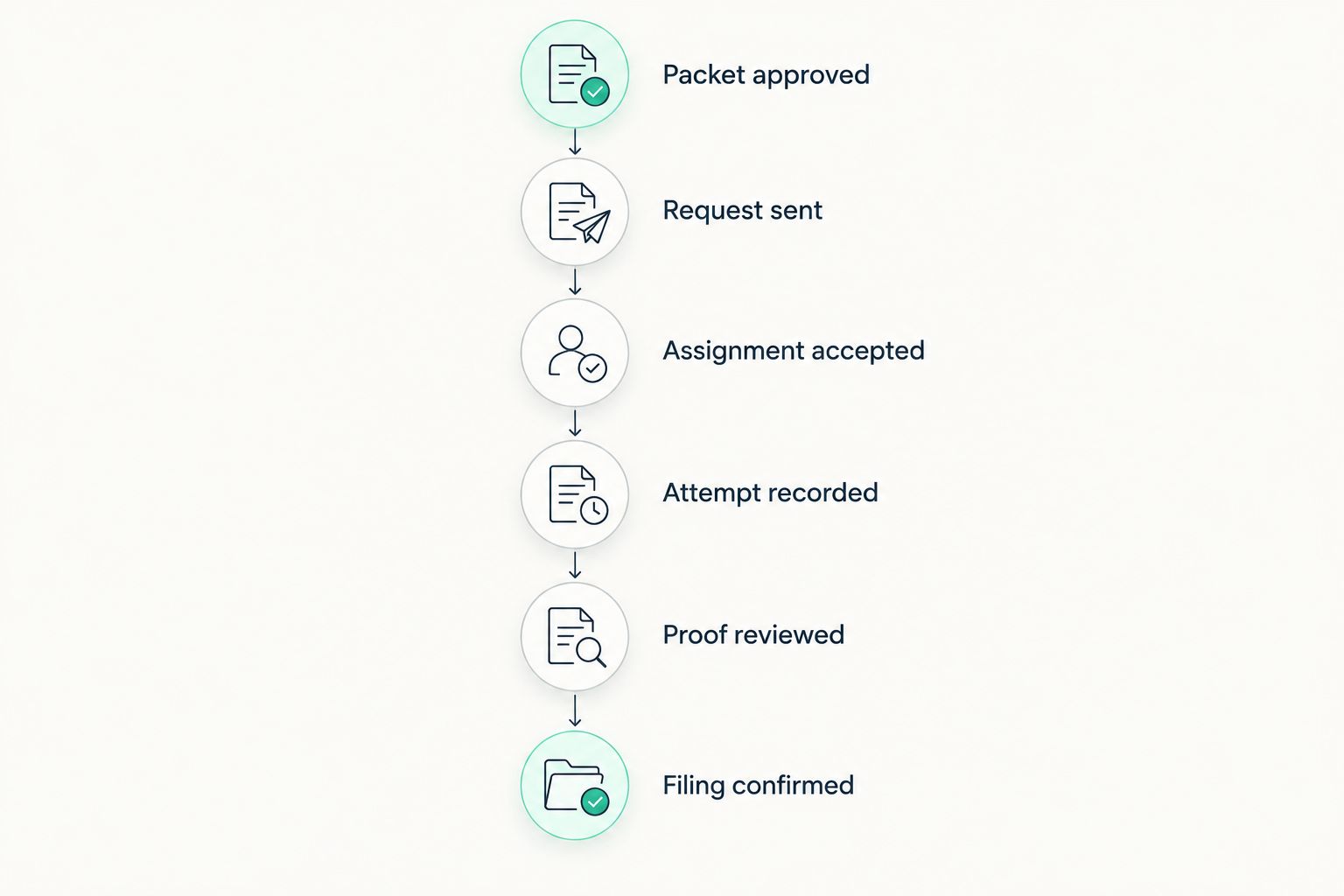
A request reference should follow the assignment through every update. If the provider supplies a different reference, store both references together rather than replacing your internal identifier.
Attempt updates and exception handling
Reconcile progress without redispatching
- Set a follow-up task using the agreed communication arrangements and the matter's deadline. Assign it to a named person rather than leaving it in an unowned inbox.
- Attach or record each provider update against the correct recipient request. Preserve the reported attempt date, time, address, and outcome without rewriting an unsuccessful attempt as completed service.
- Separate factual reports from decisions. Record what the server reported, then document the authorized next instruction in its own entry.
- Route address problems, access concerns, revised documents, and deadline changes to the request owner. Obtain acknowledgment when an instruction changes; sending a message alone does not establish that the change reached the field assignment.
- Keep a visible exception checkpoint labeled Action needed until the responsible person resolves the issue. Do not close it merely because another follow-up message was sent.
Expected result: Your PracticePanther matter shows the latest reported event and the next responsible person, without creating a duplicate assignment every time information changes.
For your 2026 checklist, distinguish these adjacent workflows:
| Workflow | Best for | Advantage | Limitation |
|---|---|---|---|
| Initial service request | A newly approved recipient assignment | Gives the provider a complete starting packet | Requires acceptance before staff treat it as active |
| Existing assignment update | Corrected instructions or new information | Preserves continuity and assignment history | Requires acknowledgment and a clear superseded version |
| Address research request | An address problem requiring investigation | Separates research from the delivery instruction | A research result is not completed service |
These are operating choices, not software integration features. Select the workflow based on the event that actually occurred, not on which document was most recently uploaded.
Proof review and filing record
Close the evidence loop
- Save the returned proof against the correct matter and recipient request. Preserve the original received file and its receipt information.
- Compare the proof with the assignment: case identification, recipient, documents identified, reported service details, and completion of the relevant declaration or signature fields. Send legal sufficiency questions to the responsible attorney or appropriate court self-help resource.
- Mark Proof reviewed only after the designated reviewer completes that check. If a correction is needed, retain the original and request a corrected document from its issuer rather than changing the server's declaration yourself.
- Assign filing responsibility explicitly. Record whether your team or another authorized party will submit the proof, and track that action separately from receipt of the document.
- Retain the court's filing confirmation or accepted filing record when applicable. Record a rejected submission as an unresolved filing task, not a completed filing.
Expected result: You can distinguish service completion, receipt of proof, review, and filing. The record shows the evidence supporting each checkpoint.
Use 2 review checkpoints in your internal checklist: approval before dispatch and review before closure. This is a recommended operating design, not a court rule or a PracticePanther default.
For the document distinction, read what counts as proof of service in California. A provider's progress message and a proof of service serve different recordkeeping purposes; keep both when relevant.
Update an existing assignment when information changes
An amended packet or corrected address should trigger review, not automatic redispatch. This second workflow is useful when the matter stays open but the assignment instructions change.
- Locate the active recipient request and provider reference.
- Record exactly what changed: address, document version, deadline instruction, or contact information.
- Obtain the required internal approval and send a clearly identified update through the accepted channel.
- Ask the provider to acknowledge the update and clarify which previous instructions or documents it replaces.
- Preserve the earlier version as history while identifying the current approved packet.
Expected result: One assignment has a readable revision history instead of competing instructions in separate conversations.
For 2026 revisions, add a pre-send check: “Is this an update or a new assignment?” A new recipient needs its own request under this workflow. A changed address for an existing recipient needs a documented decision about how the current assignment proceeds.
Troubleshooting
The provider cannot open the packet
Confirm the intended recipient's access and the accepted transfer method. Resend through an approved channel, then verify receipt. Do not make confidential documents publicly accessible to solve a permission problem.
Two staff members submitted the same request
Compare recipient, packet, and provider references before taking further action. Notify the provider promptly, identify the intended active assignment, and obtain acknowledgment of any cancellation or consolidation instruction.
A corrected address never reached the assignment
Send a clearly labeled update referencing the existing assignment. Request acknowledgment and keep Action needed open until the provider confirms the instruction. Do not infer acknowledgment from an internal note.
The proof identifies the wrong packet or recipient
Hold the closure task and send the discrepancy to the issuer and designated reviewer. Preserve the received document. Do not edit a signed declaration to make it match your records.
The proof is stored, but filing remains unresolved
Check the separate filing task and retained filing evidence. If submission was rejected or never made, route it to the assigned filer for action under the applicable court requirements.
Customize your workflow
Expand the process by case type without removing the approval gates. A family matter, eviction assignment, and probate notice can require different documents and instructions; the responsible reviewer must supply those requirements.
Golden Hill Legal Runner LLC provides process serving across San Diego County, including civil, family, eviction, probate, and small claims matters. Its service scope does not turn this checklist into legal advice or a determination of the correct service method.
Before adding automation to your 2026 workflow, test the proposed handoff with fictional data. Check whether it creates duplicate requests, exposes unrelated documents, or marks an assignment complete when only a file has arrived. Keep dispatch approval and proof review under named ownership.
FAQ
Can I use PracticePanther to organize a process server workflow?
Yes. Organize the matter, approved packet, recipient request, updates, and returned proof around a shared assignment reference. This guide uses a controlled handoff rather than assuming a native process server integration.
Does this workflow automatically send assignments to Golden Hill Legal Runner LLC?
No. This workflow requires you to confirm the provider's accepted intake channel and obtain assignment acknowledgment. Do not treat a document upload or internal task as an accepted service request.
What should I send with a process serving request?
Send the approved documents, recipient details, address, case reference, authorized instructions, and return contact. Have the responsible reviewer confirm legal deadlines and service requirements before dispatch.
Should each recipient have a separate service request?
Yes, use a separate recipient request in this operating checklist. That keeps attempts, instructions, and returned proof from being confused across people in the same matter.
What happens when the service address changes?
Send an identified update referencing the existing assignment and obtain acknowledgment. Record the approved address and preserve the earlier instructions as history.
Does receiving proof of service mean it has been filed?
No. Receipt of proof and court filing are separate events. Assign filing responsibility and retain the applicable filing confirmation or accepted filing record.
Can I edit a returned proof of service to fix an error?
Request a correction from the issuer rather than editing the server's signed declaration yourself. Preserve the original and route questions about legal sufficiency to the responsible attorney or appropriate court self-help resource.
One last thing
Make closure depend on evidence, not on a green status. Before marking an assignment complete, open the returned proof and verify the separate filing record when filing is required. That final check is more useful than another reminder attached to an already closed task.
Not a law firm. No legal advice provided.