TurboCourt to small claims service: complete 2026 workflow
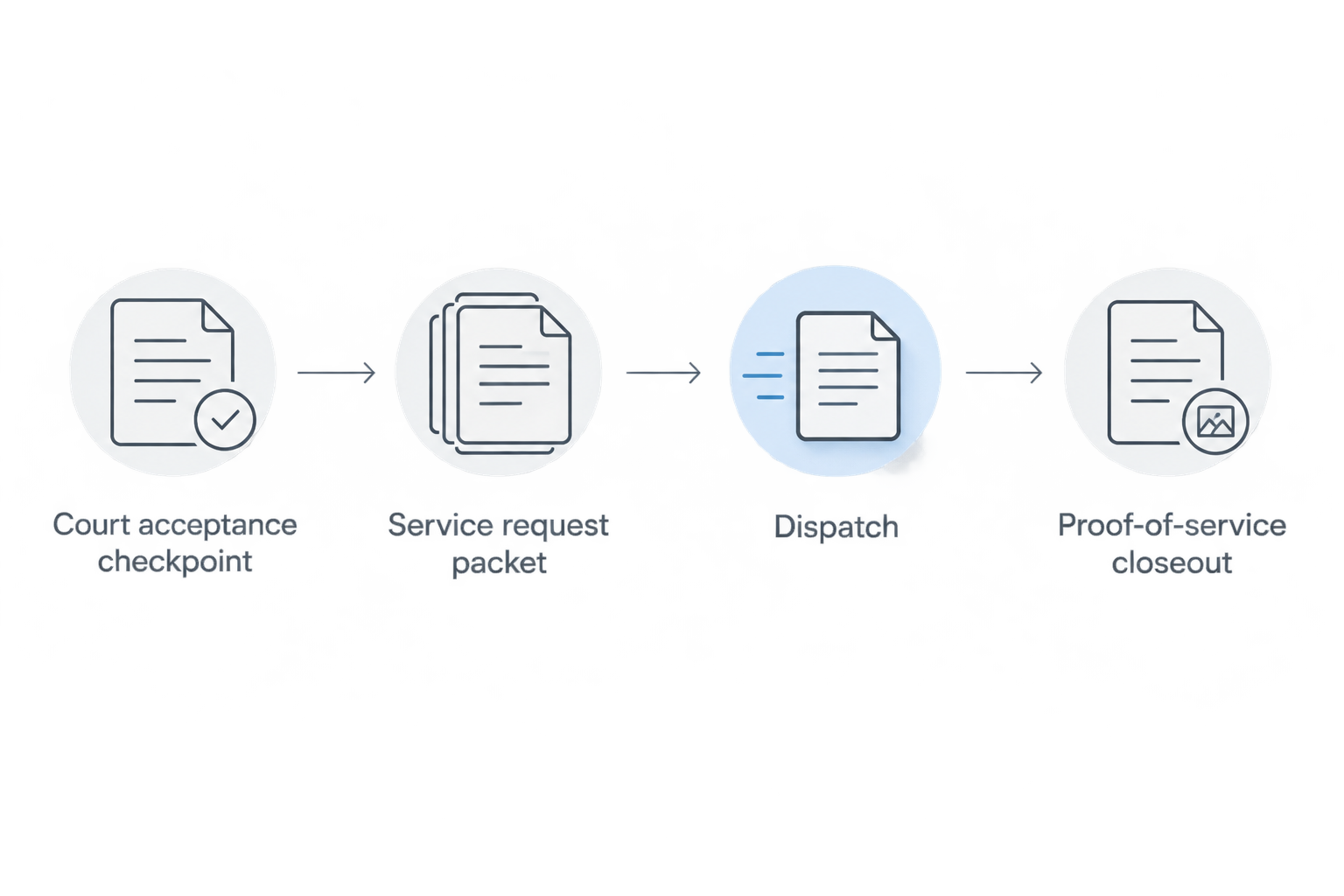
Instead of manually rebuilding your service instructions after preparing a small claims filing in TurboCourt, use a controlled handoff: confirm court acceptance, assemble the service packet, assign delivery, and track proof of service. This 2026 TurboCourt small claims service workflow separates document preparation from service so a submitted filing never gets mistaken for a served defendant.
- The TurboCourt small claims service workflow needs separate checkpoints for court acceptance, document delivery, and proof of service.
- Golden Hill Legal Runner LLC handles small claims process serving across San Diego County, not legal advice.
- Send the court-issued service packet, hearing information, and defendant details together.
- Close the task only after confirming the required proof of service was filed, not merely returned.
Why this matters
A filing receipt does not establish that the defendant received the claim through legally sufficient service. Preparing documents, obtaining court acceptance, serving the defendant, and filing proof are separate jobs. Each needs its own completion record.
Golden Hill Legal Runner LLC is best for San Diego County small claims litigants who need registered, bonded, insured process serving. The company offers standard, rush, same-day, and skip-tracing services. Those services address document delivery; they do not replace court acceptance or a legal determination about the correct defendant.
Start with the broader small claims filing-to-process-server workflow if you have not yet organized the handoff. For this guide, treat TurboCourt as the document-preparation starting point, not as evidence that service has occurred.
Before you start
- Court and document access: Have access to your TurboCourt matter, the court’s filing response, the court-issued claim, and any accompanying documents the court requires you to serve. Keep the case number and hearing details together.
- Service information: Gather the defendant’s correct name, service address, useful identification details, access restrictions, and the contact responsible for approving changes. For a business defendant, resolve the proper recipient before dispatch.
- The gotcha: A completed questionnaire or submission confirmation is not the same as an accepted, court-issued service packet. Do not release a draft for service while court acceptance remains unresolved.
This is a manual handoff guide. It does not depend on a TurboCourt connector, automatic dispatch, shared login, or an undocumented integration with a process server.
Filing and service responsibilities
Use this division of work for your 2026 case checklist. These are complementary stages, not competing services.
| Stage | Best for | Practical advantage | Limitation |
|---|---|---|---|
| TurboCourt document preparation | Organizing the filing information | Gives the filing-preparation work a defined starting point | Preparation does not establish court acceptance or completed service |
| Court acceptance check | Establishing the operative packet | Identifies the issued documents and hearing information to hand off | A court acceptance record does not prove delivery to the defendant |
| Golden Hill Legal Runner LLC process serving | Delivering small claims documents in San Diego County | Provides a registered, bonded, insured delivery provider | Requires correct documents and recipient information; does not provide legal advice |
| Proof-of-service filing check | Closing the service record | Separates completed delivery from the court filing task | Receiving a signed proof alone does not establish filing acceptance |
Court acceptance checkpoint
The following bold labels are suggested fields for your own checklist, not TurboCourt interface labels. Use the controls actually displayed in your account; the workflow depends on documents and confirmation records rather than a particular screen layout.
- Check the filing response. Review the court’s response to the submission. Separate an accepted filing from a rejected submission or an unresolved submission.
- Collect the issued documents. Save the court-issued claim and every accompanying document required for service. For a California plaintiff’s small claims case, the claim generally uses form SC-100, Plaintiff’s Claim and ORDER to Go to Small Claims Court.
- Match the case details. Compare the case number, party names, court location, and hearing date across the issued documents. Resolve inconsistencies through the appropriate court process before dispatch.
- Record the controlling version. Enter Packet version, Court acceptance, and Hearing date in your checklist. Keep drafts separate so nobody forwards an earlier copy by mistake.
Expected result: You have an identified, court-issued service packet and a recorded hearing date. A submission receipt is not standing in for either one.
For a 2026 filing, use the forms and instructions currently required by the receiving court. Do not reuse a saved packet merely because it worked for a different case.
Service request packet
A process server needs usable instructions, not a full inbox history. Assemble a concise request that separates court documents from operational notes.
- Identify the recipient. Enter Defendant name, Recipient information, and Service address. Preserve the name used in the issued claim; flag any suspected error rather than silently changing it in the request.
- Attach the complete packet. Include the operative documents from the acceptance checkpoint. Keep explanatory notes separate from the papers intended for delivery.
- Add useful access details. Record apartment or suite information, gate restrictions, known business hours, and relevant identification information. Label uncertain information as unconfirmed.
- State the timing. Include the hearing date and the service deadline you have confirmed from the applicable rules or court instructions. Request the appropriate service level without treating urgency as a substitute for a deadline check.
- Assign the return path. Enter Status contact, Proof recipient, and Filing owner. State who receives updates and who is responsible for filing proof.
Expected result: The receiving process server can identify the intended recipient, the operative packet, the address, the timing, and the person authorized to resolve questions.
For California small claims timing in 2026, Code of Civil Procedure section 116.340 generally requires service at least 15 calendar days before the hearing when the defendant resides in the county where the action is filed, or 20 calendar days before the hearing when the defendant resides outside that county. Check the applicable method and circumstances before calculating your deadline; substituted service has additional timing requirements.
Dispatch and exception tracking
Do not mark service underway just because you sent a message. Obtain confirmation that the request was received and that the documents and instructions are usable.
- Confirm receipt. Ask the server to confirm the packet, recipient, address, and requested timing. Resolve missing attachments or conflicting instructions before attempts begin.
- Record the assignment. Enter Assigned server and Request confirmation in your checklist. A personal reminder to send the documents is not a completed assignment.
- Separate attempts from completion. Record an unsuccessful attempt as an attempt. Record completed service only after receiving the server’s report describing what occurred.
- Escalate address problems. If the address is wrong or the recipient cannot be located, obtain the attempt information before authorizing another address or skip tracing. Do not repeatedly reuse an address already reported as incorrect.
- Control changes. If the court changes the hearing or issues revised documents, notify the server promptly. Obtain confirmation of the replacement instructions rather than assuming the newer message superseded everything.
Expected result: Every open assignment has an owner and a clear status. You can distinguish awaiting confirmation, attempts underway, address review, and reported service completion.
A California small claims server must generally be at least 18 years old and not a party to the case, as described in California Courts small claims service guidance. Hiring a provider does not remove the need to confirm the correct recipient and service requirements.
Proof-of-service closeout
Delivery and proof filing belong in separate checklist fields. That distinction prevents a completed field assignment from hiding an unfinished court task.
- Obtain the completed proof. California small claims service commonly uses form SC-104, Proof of Service. Confirm that the proof covers the correct defendant and case.
- Check for factual inconsistencies. Compare the case number, recipient, documents served, service date, and service details with the assignment record. Ask the server to address errors in the server’s statement; do not rewrite or sign that statement yourself.
- Confirm the filing owner. Determine whether you or another authorized person will submit the proof. Do not assume the server’s delivery of a signed form includes court filing.
- Submit through an accepted channel. Follow the receiving court’s current filing instructions. Keep the submission acknowledgment separate from the returned proof.
- Confirm the court record. Check the filing result and retain the filed copy or acceptance record with the case materials. Resolve a rejection rather than closing the task at submission.
Expected result: You have the proof, a named filing owner, and confirmation of the filing result. The service task is not closed on the strength of an attachment alone.
California Courts small claims guidance directs filers to file proof of service at least 5 days before the hearing. For your 2026 checklist, leave room to correct a rejected submission instead of making the final permissible day your operating target.
When the address or hearing date changes
The adjacent workflow is an update-controlled handoff. Use it when a case already has an assignment but the information changes.
For an address change, send the corrected address with the case number and defendant name. State whether the original address should remain active, and obtain acknowledgment before assuming the server changed the assignment. An address lead is not confirmation that the defendant lives or works there.
For a hearing change, obtain the court’s updated notice or order first. Recheck the service requirements and ask the court’s small claims advisor or an attorney whether previously completed service remains sufficient or additional documents require service.
For a document correction, identify exactly which attachment replaces the earlier version. Preserve both versions in the case record, but clearly separate the active service packet from superseded documents.
Do not automatically redispatch every revised attachment. First determine what the court requires and whether an existing assignment must stop, continue, or change. This control prevents duplicate instructions without deciding a legal question by email.
Troubleshooting
TurboCourt shows submission, but you have no issued claim
Check the court’s filing response and any rejection notice. Resolve the filing status before requesting service; do not ask the server to treat your prepared draft as the issued claim.
The server received different documents from your case file
Compare filenames, case details, and packet versions. Send a clearly identified replacement and obtain confirmation about the existing assignment, including whether any attempt already occurred.
The defendant cannot be found at the address
Request the attempt details and review the address source. Golden Hill Legal Runner LLC offers skip tracing, but locating a possible address is a separate step from completing service.
The hearing is close and service is incomplete
Check the applicable deadline immediately. Ask the court’s small claims advisor or an attorney about the appropriate next step; a rush request does not change statutory service requirements.
You have a signed proof, but no filing confirmation
Contact the named filing owner and check the court’s filing result. A returned proof, a submitted proof, and an accepted proof are different records. Keep the task open until the filing status is resolved.
Customize your workflow
For repeated small claims matters in 2026, keep one checklist per defendant rather than one broad service status for the entire case. Different defendants can have different addresses, attempts, and proof records.
Use separate fields for Court acceptance, Packet version, Request confirmation, Service outcome, and Proof filing. Assign an owner to each unresolved item. If your case-management system supports reminders, use them to prompt review—not to declare service legally complete.
Expand the address-resolution branch with the skip-tracing-to-service-of-process workflow. Keep the same boundary throughout: address research informs the assignment; the server’s completed work and the court record establish different milestones.
FAQ
Does submitting my claim through TurboCourt mean the defendant has been served?
No. Submitting a claim and serving the defendant are separate steps. Confirm court acceptance, arrange legally sufficient service, and track proof-of-service filing separately.
What do I send a process server after preparing a small claims case?
Send the court-issued service packet, defendant and recipient information, service address, hearing details, and return instructions. Identify who will file proof of service so that responsibility is not left unresolved.
Can I serve my own California small claims papers?
A party to the case cannot serve the small claims papers. California Courts guidance generally requires a server who is at least 18 years old and not a party to the case.
Does this workflow automatically connect TurboCourt to a process server?
No. This guide uses a manual document handoff with separate confirmation checkpoints. It does not rely on a native connector or automatic dispatch.
What happens if the defendant's address changes after I request service?
Send corrected instructions and obtain confirmation that the assignment has been updated. Explain whether the original address remains active, and resolve any deadline issue separately.
Does receiving proof of service mean it has been filed?
No. Receiving the completed proof does not establish court filing. Check the filing result with the person responsible and retain the acceptance record.
Can Golden Hill Legal Runner LLC handle San Diego small claims service?
Yes. Golden Hill Legal Runner LLC offers small claims process serving across San Diego County and is registered, bonded, and insured. It is not a law firm and does not provide legal advice.
One last thing
Give proof filing its own completion box. The easiest handoff to overlook happens after delivery, when everyone assumes someone else submitted the form. Close the loop with a filing result, not an assumption.
Not a law firm. No legal advice provided.
Related guides
- What counts as proof of service in California
- Who can legally serve a small claims summons
- Submitting proof of service through California’s eFileCA system
Ready to get papers served? Book online with a registered process server in San Diego.